BTC - Bitcoin
 USDTERC20 - USDT ERC20
 ETH - Ethereum
 BNB - Binance
 BCH - Bitcoin Cash
 DOGE - Dogecoin
 TRX - TRON
 USDTTRC20 - USD TRC20
 LTC - LiteCoin

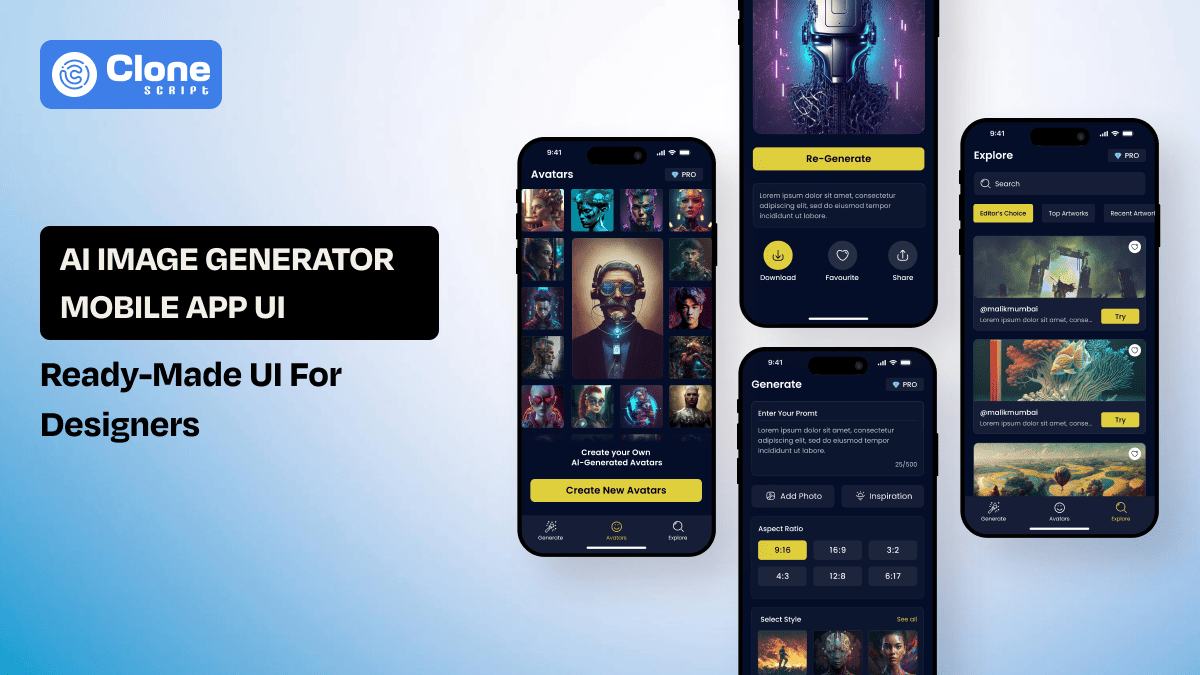
AI Image Generator Mobile App UI: Complete Design Guide with Figma Kit for Designers (2026)
Designing a product like Artificial Intelligence (AI) image generation feels exciting at one certain moment. At the second moment, everything is gone into ruin, and you start facing the frustration of balancing innovation, usability, and matching client expectations. After all, handling the intuitive and complex prompt flows, generation states, and monetization logic is not as easy as it looks.
This complete guide explains how to architect, design, and optimize a scalable AI image generator app interface in 2026. You’ll learn essential UX flows with UI design principles, performance strategies, monetization patterns, and how a ready-made AI app UI kit can significantly reduce design time while improving delivery quality.
Why AI Image Generator Mobile App UI Design Matters in 2026
Unlike traditional mobile apps, a generative AI product does not operate on predictable user inputs. It handles probabilistic outputs, latency, credit consumption, and complex rendering states simultaneously. That complexity directly impacts the AI image generator mobile app.
AI image generation looked experimental a few years ago. Now it’s everywhere. It’s inside marketing tools, content studios, creator platforms, and startup MVPs. That shift changes everything for designers. What once felt like a simple creative interface has turned into a highly structured product system.
You are not just designing screens. You are designing control over uncertainty.
An AI image generator app must manage:
-
Prompt-based creative input
-
AI processing feedback loops
-
Multiple output variations
-
High-resolution image previews
-
Saved galleries and history tracking
-
Credit-based usage logic
Each of these layers adds cognitive weight. If not structured properly, friction compounds quickly.
When users enter a prompt and wait for results, they are placing trust in the system. If the interface feels unclear during generation, they don’t blame the model. They blame the product. Confusing feedback states immediately reduce perceived quality.
Modern user expectations in 2026 are extremely refined. They expect:
-
Clean and distraction-free prompt composition
-
Smart suggestions and style presets
-
Seamless animated generation states
-
Minimal cognitive overload
-
Transparent credit deduction visibility
Users want ability, but they do not want complexity.
Primary UX Flows Every AI Image Generator App Must Include
Strong architecture precedes aesthetics. A robust AI image generator app design relies on clearly defined UX flows.
Without structured flows, even powerful AI models feel chaotic.
1. Onboarding & Account Setup
The first 60 seconds determine whether users stay or uninstall.
Onboarding must instantly communicate value while removing friction from the experience. Users download an AI image generator to create visuals quickly. They do not navigate complex tutorials or lengthy explanations. The process should feel inspiring, not instructional.
Instead, focus on:
-
Visual previews of high-quality AI-generated images
-
Short, actionable prompt examples users can try instantly
-
Clear explanation of credits or usage limits
-
Fast social login options for seamless entry
Limit onboarding to three to five concise screens and segment users by goals to personalize the journey and increase early engagement.
2. Prompt Creation & Editing Flow
The prompt editor is the creative engine.
This space should feel open, intuitive, and experimentation-friendly rather than technical or overwhelming. Users must feel confident typing ideas without confusion about controls or parameters.
Essential design considerations include:
-
Large, distraction-free text input
-
Visual style presets for quick selection
-
Clearly visible aspect ratio options
-
Simple regenerate and refine buttons
Keep visible options between three and five core controls. For this, advanced settings should remain collapsible. Referring to the flow that must support continuous editing, quick iterations, and effortless refinement to encourage creative exploration.
3. AI Processing & Feedback State
AI generation can take seconds or longer, depending on complexity. The interface must manage anticipation and reduce uncertainty during processing time.
Use the following:
-
Animated progress indicators
-
Real-time text updates like “Refining textures…”
-
Subtle motion or background transitions
-
Proper placeholders for image previews
When clear processing states look, it increases perceived reliability and user confidence. Never leave users guessing about what is happening. If generation fails, provide actionable error messages with retry guidance instead of generic alerts that damage trust.
4. Image Results & Variation Flow
The output screen defines user satisfaction and perceived product quality.
Best practices include:
-
Clean grid layout with consistent spacing
-
Tap-to-expand high-resolution preview
-
Swipe navigation between variations
-
Variation and upscale action buttons
Users frequently explore multiple results, so the UI must support comparison without clutter. Display the original prompt beneath each output to reinforce learning, iteration, and creative improvement through contextual feedback.
5. History, Gallery & Asset Management
Retention depends on structured content persistence and easy retrieval.
Your AI image generator mobile app UI must include:
-
Searchable prompt and result history
-
Filters by date, format, or style
-
Favorites or collections tagging system
-
Download and export tracking
As user libraries expand, discoverability becomes important. Strong organization reduces friction, encourages reuse, and increases long-term engagement by making past creations instantly accessible.
Essential UI Components for AI Prompt-Based Mobile Apps
Beyond flows, component-level precision defines usability quality and long-term engagement. Small interface decisions influence confidence, speed, and creative satisfaction more than most teams anticipate. Every tap, animation, and layout choice should feel intentional and supportive rather than decorative or distracting. Focus on the UI components design as mentioned:
-
Prompt Input Modules
Design prompt inputs to encourage clarity and creativity. Include the following:
-
Multi-line expandable text area
-
Character counter indicator
-
Style preset chips
-
Quick-add modifier buttons
-
Advanced toggle dropdown
The micro-interactions reduce friction, guide better prompts, and improve creative output quality without overwhelming new users.
-
Output Display Systems
Output screens must balance immersion and utility. Implement the following:
-
Masonry or structured grid layout
-
Adjustable preview sizing options
-
Zoom and pan gestures
-
Overlay action buttons
Avoid decorative clutter that competes with the artwork. The interface should highlight generated visuals while keeping essential tools accessible but unobtrusive.
-
Action Panels
Primary actions should include:
-
Download
-
Share
-
Regenerate
-
Edit prompt
-
Save to collection
Position controls within thumb-friendly zones to support one-handed mobile use. A clear hierarchy ensures users instantly understand the next logical step after viewing results.
-
Credit & Usage Indicators
AI apps commonly operate on usage limits. The UI must clearly communicate:
-
Remaining credit balance
-
Cost per generation
-
Current subscription tier
-
Upgrade call-to-action
Transparency reduces churn, builds trust, and minimizes support requests caused by confusion around usage limits or billing expectations.
Designing for Performance: Speed, Feedback & AI Processing States
Performance perception is equally important as back-end development and optimization. Users judge speed based on visual response, not server metrics. A well-designed interface can make complex AI processing feel fluid, controlled, and reliable even when generation takes several seconds.
-
Perceived Speed Optimization
Even if processing requires time, perceived speed can be improved using:
-
Animated loaders with purposeful motion
-
Gradual content reveal patterns
-
Smooth transition easing effects
-
Progressive image rendering techniques
Responsive micro-animations reassure users that the system is working. Thoughtful feedback reduces abandonment during waiting time and strengthens perceived technical sophistication.
-
Intelligent Error Handling
AI models occasionally fail due to prompt structure, server load, or network instability. The UI should provide:
-
Clear, human-readable explanations
-
One-tap retry buttons
-
Prompt correction suggestions
-
Basic network diagnostic hints
Avoid generic error alerts. Actionable guidance builds resilience into the experience and preserves user trust during technical interruptions.
-
Device Responsiveness
Your design system must adapt seamlessly across varying screen sizes and resolutions. Ensure these aspects:
-
Flexible grid systems
-
Auto-layout based components
-
Responsive typography scaling
-
Touch-optimized spacing
A scalable AI mobile app UX design prevents costly redesigns, supports future device expansion, and ensures consistent usability across smartphones and larger display formats.
Monetization UI in AI Image Making App: Subscription, Credits & Premium Features
Revenue structure must integrate naturally into the user experience rather than interrupt it. Monetization elements should feel supportive and transparent, implement value instead of creating friction. When handled correctly, billing interfaces build trust and encourage upgrades without damaging creative momentum.
-
Credit-Based Interface Design
Display credits visibly but elegantly. Include the following:
-
Top navigation credit badge
-
Low-balance notification alerts
-
Cost-per-generation transparency
-
Preview notice before deduction
Users must never feel surprised by deductions. Clear placement near generation controls reinforces accountability, reduces complaints, and builds long-term confidence in the platform’s fairness.
-
Subscription Upgrade Experience
Upgrade flows should communicate value, not pressure. Include the design elements:
-
Tier comparison cards with clear differences
-
Visual indicators of locked features
-
Free trial or bonus credit highlights
-
Benefit-focused headlines over pricing focus
Emphasize productivity gains, higher resolution outputs, faster generation speeds, and expanded creative freedom. A value-driven upgrade experience increases conversions while maintaining positive brand perception.
Dark Mode, Personalization & Modern Mobile Design Trends in AI Image App (2026)
Generative AI applications are not so visual, making aesthetic presentation central to user satisfaction. Interface design must enhance artwork rather than compete with it. Visual comfort, presentation, and contextual intelligence define modern mobile AI experiences in 2026.
Dark mode improves:
-
Contrast between UI and artwork
-
Perceived image vibrancy
-
Battery efficiency on OLED screens
-
Creative immersion during browsing
Dark environments reduce eye strain and allow generated images to stand out. Proper elevation, shadow depth, and subtle gradients prevent flat, lifeless interfaces.
Modern 2026 Mobile Design Trends
Emerging trends include:
-
Minimal, high-legibility typography
-
Soft glass or blurred overlay panels
-
Context-aware AI recommendations
-
Gesture-driven navigation systems
Personalization algorithms now suggest visual styles, aspect ratios, and modifiers based on previous prompts. The UI must integrate adaptive suggestions seamlessly, presenting them as helpful enhancements rather than intrusive interruptions to creative flow.
Common UX Mistakes in AI Image Generator Apps
Avoid these design pitfalls in an AI image generation app:
-
Overcrowded Prompt Interface: Having too many sliders overwhelms new users and reduces engagement rate, which results in app uninstallation.
-
Hidden Credit Mechanics: Lack of transparency damages trust quickly. If not showcase how much the credit users have to generate an image using AI, it will create doubt.
-
Static Loading Screens: Unanimated loaders reduce perceived reliability. The dynamic progress representation improves trust for users in the app.
-
Disorganized Gallery Layout: Poor hierarchy reduces the app's engagement rate, and it’s not recommended.
-
Inconsistent Design Tokens: Misaligned spacing and typography harm perceived quality. You have to manage it in a proper manner.
In essence, a cohesive system strengthens brand authority.
Build from Scratch vs. Using an AI App UI Kit
Design teams face a strategic decision when creating an AI image generator mobile experience. The choice directly affects timeline, cost, scalability, and competitive positioning. Whether building entirely from the ground up or using a pre-built design system, the approach must align with business goals and speed-to-market priorities.
-
Building from Scratch
Here are the advantages of this option:
-
Complete creative control
-
Brand-specific information architecture
-
Unique layout and interaction patterns
-
Full customization flexibility
Custom UI design for the app builds allows precise alignment with brand identity and product vision.
Challenges in this option:
-
Longer wireframing and validation cycles
-
Higher upfront design investment
-
Repeated component development
-
Increased stakeholder revision loops
For startups racing competitors, extended timelines can become expensive. Every additional design sprint delays testing, feedback collection, and revenue generation.
-
Using an AI App UI Kit
Here is the list of advantages of using UI designs:
-
Accelerated prototyping workflows
-
Pre-defined AI-specific user flows
-
Structured, scalable design systems
-
Lower iteration and testing costs
-
Faster developer handoff
A strong AI-focused UI kit reduces friction between ideation and implementation.
Limitations for choosing this option:
-
Requires thoughtful customization
-
Needs careful brand integration
-
May include unnecessary components
However, a well-structured Figma AI app UI template can significantly reduce production pressure while preserving design quality and consistency.
How a Ready-Made AI Image Generator Mobile App UI Kit Saves 50% Design Time
A professional UI kit includes:
-
Fully designed onboarding flows
-
Prompt composition screens
-
Processing animations
-
Output grid templates
-
Monetization flows
-
Organized component libraries
-
Auto-layout structures
-
Design tokens for scalability
This eliminates repetitive work.
Designers can focus on:
-
Brand differentiation
-
UX testing
-
Advanced feature enhancement
-
Motion design refinement
Instead of spending weeks structuring layouts, teams validate product-market fit earlier.
For agencies, this improves margin efficiency. For SaaS teams, it accelerates MVP launches.
Virtual Verse App UI Kit: A Scalable Solution for Designers & Teams
If you are developing an AI-powered creative app, the Virtual Verse App UI Kit provides a structured starting point tailored to generative AI workflows.
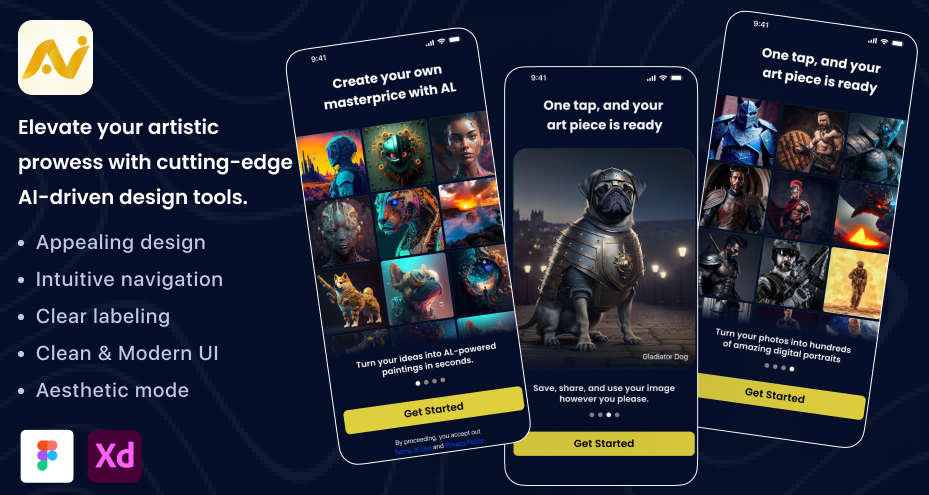
By using the UI, you can experience key advantages like:
-
Complete AI-focused mobile screens
-
Prompt-centric architecture
-
Organized Figma files
-
Cross-platform adaptability
-
Modern 2026 UI aesthetics
The structure supports:
-
Creative prompt flow
-
Variation generation
-
Monetization display
-
Gallery management
-
Scalable expansion
Instead of blank artboards, your team starts with a professional system.
For design teams juggling multiple client deadlines, this UI reduces repetitive groundwork.
Final Checklist Before Launching Your AI Image Generator Mobile App UI
Before development handoff, confirm:
-
Prompt creation flow is intuitive
-
Processing states are visually dynamic
-
Credit usage is transparent
-
The gallery system is scalable
-
Dark mode is optimized
-
Typography hierarchy is consistent
-
Auto-layout components are structured
-
Monetization UI is value-driven
-
Error states are user-friendly
-
Design tokens are standardized
A refined AI image generator mobile app UI aligns creativity, usability, performance, and monetization.