BTC - Bitcoin
 USDTERC20 - USDT ERC20
 ETH - Ethereum
 BNB - Binance
 BCH - Bitcoin Cash
 DOGE - Dogecoin
 TRX - TRON
 USDTTRC20 - USD TRC20
 LTC - LiteCoin

Currency Converter Figma App Design (2026): UI/UX Trends, Best Practices
Designers know the challenge of creating financial apps that are both reliable and visually intuitive. In currency converter apps, even small UI or UX flaws, such as confusing input fields or unclear conversion results, can disrupt the user experience, leading to frustration and reduced engagement.
This blog explains the latest trends and best practices in currency converter app design, highlights essential UI/UX principles, and explains how using a ready-made Figma UI template can streamline your workflow, improve design consistency, and help you deliver a polished, client-ready app efficiently.
Why Excellent Currency Converter UI Design Matters in 2026
In 2026, a currency converter app directly impacts user trust and retention. Users expect instant, accurate conversions within a frictionless workflow. Unclear inputs, slow updates, or weak visual hierarchy reduce credibility. Modern interfaces must prioritize speed, transparency, and intuitive navigation to ensure reliability and competitive fintech differentiation.
Essential UI/UX Principles for Currency Converter Apps
When designing a currency converter app, clarity and usability are non-negotiable.
Users shouldn’t have to think twice about where to input amounts or how to read results. Every design element, from buttons to input fields, must be purposeful. For that, the user interface and user experience principles work. Here’s how to achieve that:
-
Prioritize Simplicity and Minimalism
Less is always more in financial apps. You have to avoid cluttered screens, unnecessary menus, or decorative elements that don’t serve a functional purpose. So, what to do? Focus on the core workflow:
-
Input amount
-
Select currencies
-
View results
Fintect app designers usually consider progressive disclosure, showing advanced options (like historical trends or conversion charts) only when needed. This keeps the main screen clean while still providing depth for pro users.
-
Create a Clear Input-to-Output Flow
The journey from typing an amount to seeing the converted result must be seamless. Don’t create confusion or be too complex to understand.
Then, highlight the active input field with subtle shadows or color changes. Here, ensure results update instantly without extra taps.
Finally, consider adding dynamic feedback like “Conversion updated just now” to reassure users that the data is accurate.
-
Optimize for Accessibility and Responsiveness
Financial apps must cater to everyone, not only a segmented group of users, until the app is made for them. This means the design has to be optimized for:
-
High contrast ratios for readability
-
Scalable fonts for various screen sizes
-
Touch-friendly zones for mobile users
-
Screen-reader compatibility
By designing with accessibility in mind, your app is not just inclusive, it also reduces errors and builds trust, which is critical in financial tools.
-
Build Trust Through Visual Feedback
Most of the users trust the apps when it comes to finance when they feel confident in them. Thanks to the subtle cues, it can happen.
Micro-interactions, such as animated conversions, highlighting changes in exchange rates, or visual confirmation of inputs, give real-time feedback and make the interface feel alive.
-
Consider Contextual Enhancements
A unique factor that can make your finance app stand out: context-aware design. For example:
-
Suggesting frequently converted currencies automatically. This helps users; the app is not a generic but a useful tool.
-
Highlighting the most relevant currencies based on user location. From it, the engagement rate of the app will improve.
-
Providing quick access to historical rates or favorites. This is necessary when the product is designed for the Your Money Your Life (YMYL) industry.
These small touches transform a basic converter into a smart, user-centered app, increasing usability and delight.
Top Features Every Currency Converter App Must Support (and How to Design Them Properly)
Is a currency converter app only about multiplying numbers?
Not actually.
In 2026, users expect speed, personalization, and intelligence. If your feature set feels outdated, the design won’t compensate for it.
Here’s what your interface must support, and how to design each feature strategically.
1. Real-Time Exchange Rates with Visible Timestamp
Live exchange rates are the foundation of trust in the currency converter mobile application. But simply fetching data from an API isn’t enough; you must design for transparency.
We recommend that you include the following:
-
A visible “Last updated” timestamp that explains no outdated exchange rate information is displayed.
-
Subtle refresh animation when rates update that creates a connection
-
Optional manual refresh control for tentative users who make instant decisions.
This reassures users that the data is current. Without this, even accurate rates can feel unreliable.
2. Multi-Currency Support with Smart Search
Users frustrates when they don’t find a favorite currency to convert. But they pushed to scroll the long handles multiple times. It’s a clear UX fault and has to be resolved. Prefer these tips to fix them:
-
Implement search-as-you-type functionality. AI-powered smart search completion integration makes the task easier.
-
Allow filtering by currency name, code (USD, EUR), or country. This sounds relatable to users.
-
Add flags carefully (but never rely on flags alone, currencies aren’t always country-exclusive). Re-check that the flags and currency represent the same country or region.
For frequent users who daily spend around 15-20 minutes on the app, you can reduce friction by placing recently used or favorite currencies at the top.
3. Instant Auto-Conversion (No Extra Buttons)
Usually, when using the latest currency converter mobile application, you find that they do not place the “ Convert” button everywhere until it's required.
As soon as the user enters a value or switches currencies, the app has to perform the following:
-
Update the result instantly
-
Highlight the converted value visually.
-
Provide subtle animation for feedback.
This reduces cognitive friction and aligns with user expectations for real-time systems.
4. Currency Swap Interaction
The currency swap feature (⇄) in the fintech converter app seems small. But it’s an important interaction point.
The UI design considerations for this feature have to be:
-
Use a clearly recognizable swap icon that is tappable in a single click.
-
Animate the swap smoothly. Don’t be too fancy or advanced here. Prioritize simplicity.
-
Maintain the entered value correctly after switching to reduce the confusion.
In essence, poorly implemented swaps are one of the most common user experience errors in financial apps.
5. Historical Exchange Rate Charts
The one thing about the Fintech apps is that they are rarely used for a single action. They’re usually designed to fulfill the context.
So, when implementing the design and coding for it, prioritize to include:
-
7-day, 30-day, 6-month views. This is a common functionality in every finance related apps.
-
Simple line charts (avoid overly complex graphs). As most users are looking to convert the currency, don’t be too advanced unless it’s required by the client’s request.
-
Clear data labeling. This is important to clarify where the exchange rates are coming from.
From a design perspective, check that charts are readable on small screens and do not overwhelm the primary conversion function.
6. Offline Mode with Cached Rates
You can say this is an advanced features now Fintech apps usually offer. As you know, travelers frequently use currency apps in low-connectivity areas. If the app is already optimized for smooth operation, it is preferable for users.
Follow this design strategy:
-
Clearly indicate when the app is in offline mode.
-
Show “Using last updated rate” with a clear date and time.
-
Prevent misleading real-time labels.
Transparency here builds trust rather than confusion.
7. Rate Alerts & Notifications
To move beyond utility and increase engagement in the app, consider rate alerts. This is a notification feature that every currency converter app prefers to have.
Using it, users can do:
-
Set a target rate for conversion without watching all the time.
-
Receive notifications when the threshold is reached.
From a UI perspective, make alert setup simple. Avoid multi-step forms. Use sliders or quick input fields. This transforms the app from a passive tool → proactive assistant.
8. Favorites & Frequently Used Currencies
According to web design psychology, a successful design is created to make the users' tasks convenient for them. In the currency convert app, a common behavior is that users repeatedly convert the same currency pairs.
Prioritize to enhance UX by:
-
Automatically detecting usage patterns
-
Pinning top currency pairs
-
Allowing manual “Add to Favorites.”
This is a small feature with a large retention impact.
9. Dark Mode and Visual Comfort
Dark mode is no longer optional in any of the mobile application and finance app has no exception. It reduces eye strain and improves usability in low-light conditions.
So, design the app properly by following these tips:
-
Adjust contrast, not just invert colors.
-
Maintain readability of charts and data.
-
Ensure color-coded indicators remain accessible.
Financial data must remain clear in both dark and light themes.
10. Localization & Number Formatting
This feature is often overlooked. But it proved to be crucial for apps that want to reach a global audience rather than a local region.
The app design has to support these elements:
-
Present different decimal formats (1,000.00 vs 1.000,00) clearly without errors.
-
Localized currency symbols that people find relevant to use.
-
Regional preferences like language and culture.
Ignoring localization weakens the credibility of a global currency tool.
Trends Shaping Currency Converter App Design in 2026
In 2026, static apps in the finance field no longer exist, and only functional is not acceptable. App designers have to build adaptive, data-aware, and behavior-driven interfaces that respond intelligently to user habits. The goal is about faster conversion and smarter interaction.
-
AI-Driven Personalization:
This app design is becoming standard. All credit goes to the Artificial Intelligence system. Apps now prioritize frequently converted currency pairs, reorder lists dynamically, and surface preferred currencies automatically. This reduces friction and shortens task completion time. You can prefer AI in web design for more prominent feedback rather than manual sorting.
-
Predictive UX Insights:
When talking about this trend, we can say only that it adds another layer of value to the currency converter app. Instead of only displaying current rates, modern interfaces can highlight recent fluctuations, show mini trend indicators, or suggest optimal conversion timing. These contextual signals improve decision-making without confusing the user.
-
Human-Centered Fintech Design
This trend focuses on clarity and reassurance. Transparent workflows, visible rate timestamps, and clear input/output separation help users trust the system instantly. So, they don’t have to check the app’s legitimacy from Google search and third-party verification.
-
Accessibility-First Interfaces
When the interfaces are already included from the start, it results in your favor. Through scalable typography, strong contrast ratios, haptic feedback, and voice-assisted navigation, ensure inclusivity across diverse users.
These trends enhance aesthetics along with they reduce drop-off, improving retention, and strengthening product credibility in competitive fintech markets. Client’s app doesn’t have to face issues when prioritizing these app design trends.
How a Ready-Made UI Design Saves Time & Enhances Quality?
Designing a currency converter app from scratch requires wireframing, component structuring, spacing systems, state variations, and repeated testing. All of these have to be completed before development even begins. In fintech app projects, where precision and consistency matter, this process can quickly consume timelines and budgets.
A professional currency converter app UI eliminates that repetitive groundwork. It provides structured, production-ready assets such as:
-
Pre-built mobile screens aligned to real conversion workflows
-
Pixel-perfect UI components with consistent spacing and grid systems
-
Defined typography hierarchy and accessible color palettes
-
Fully editable layouts for Figma, Adobe XD, and Sketch
Why all these matters?
Ask yourself: do you like to invest your 30-days in designing dropdowns, currency selectors, swap interactions, and result cards? No.
You can focus on improving user flow, enhancing micro-interactions, and tailoring branding to the client. That means fewer revisions, faster implementation, and cleaner front-end execution.
For agencies handling multiple fintech app development projects, a UI kit ensures design consistency, predictable timelines, and scalable workflows without compromising quality or creativity.
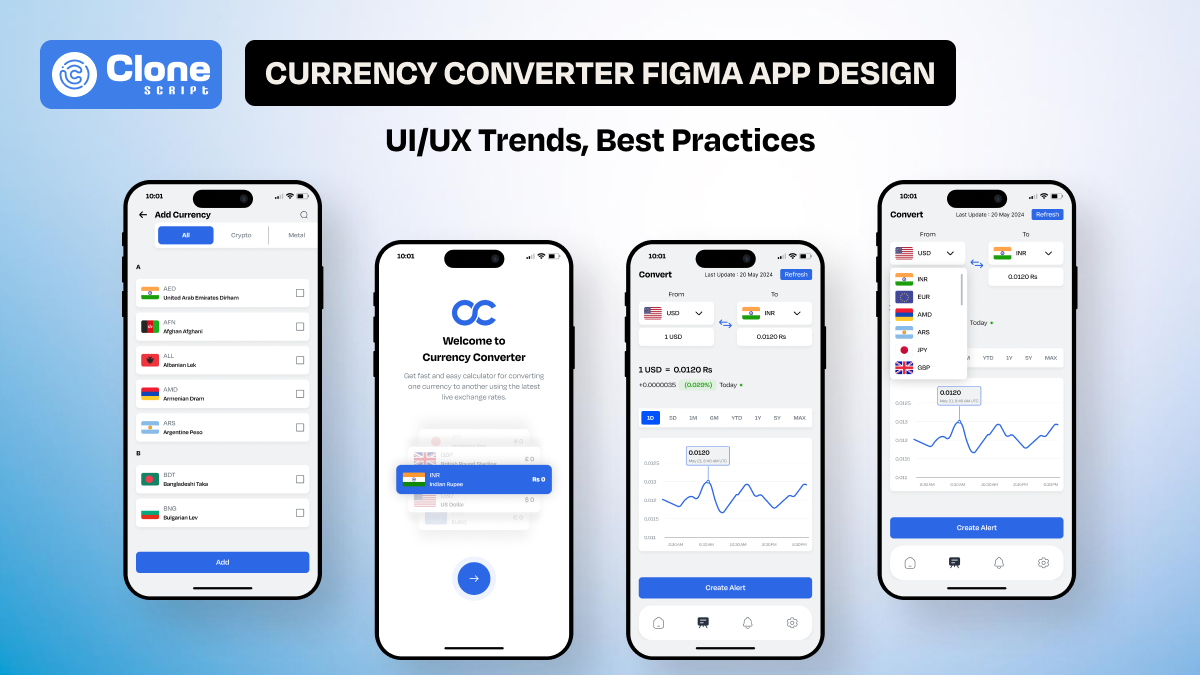
Presenting Currency Converter App Figma UI from AllClone Script
This currency converter app UI is structured specifically for fintech and utility-based mobile applications. Instead of generic UI screens, it provides conversion-focused layouts that align with real currency exchange workflows, making it practical for real client projects.

Key optimized screens added to this app UI design:
-
Country selection interface built into UI layouts
-
Multi-language support for global usability
-
Voice-enabled search for faster currency lookup
-
Built-in cryptocurrency support for hybrid finance apps
-
Integrated currency calculator screens
-
Visual charts for trend visualization
-
Price alert creation panels included
For finance iOS and Android mobile app development teams, it provides a stable starting point that reduces structural rework and improves production readiness.
Conclusion
In 2026, a currency converter app is more than a functional tool. It’s a trusted interface that users rely on daily. Applying modern UI/UX principles, following best practices, and leveraging predictive, adaptive features ensures your app stands out in the competitive fintech landscape.
For designers and teams who want to accelerate projects and maintain high-quality standards, the AllCloneScript Currency Converter App UI Kit is a ready-to-use solution that saves time, enhances usability, and ensures professional results.