BTC - Bitcoin
 USDTERC20 - USDT ERC20
 ETH - Ethereum
 BNB - Binance
 BCH - Bitcoin Cash
 DOGE - Dogecoin
 TRX - TRON
 USDTTRC20 - USD TRC20
 LTC - LiteCoin


MLM Website Design in Figma: Making the Development Task Organized
The fact is that Multi-Level Marketing (MLM) website design and development is not just about organizing the icons, writing the code, and deploying. Then, what?
A successful project begins with a well-structured design that clearly defines the user experience, interface elements, and functionality before development starts.
This is where Figma becomes an essential tool. It enables designers, developers, and stakeholders to collaborate in a shared workspace in an organized design system. Every page, component, and interaction can be reviewed and refined before coding begins. As a result, the development team receives a clear roadmap instead of making assumptions throughout the project.
Whether you're building a binary MLM platform, matrix plan, referral system, or eCommerce-based MLM solution, organizing the website design in Figma makes the entire website development process more efficient. From responsive layouts to reusable components, a structured design minimizes errors and ensures consistency across every page.
In this guide, you'll learn why Figma has become the preferred choice for MLM website design, the essential pages every project should include, and how an organized design system helps developers deliver better software faster.
What Is Multi-Level Marketing Website Design?
An MLM website is a platform that allows companies to manage distributors, customers, commissions, products, referrals, and team structures from a centralized system. Unlike a standard business website, an MLM platform includes numerous user dashboards, financial reports, genealogy views, and account management features.
Because of its complexity, planning the user interface is critical before development begins. Designers must create interfaces that simplify complicated workflows and make information easy to understand.
A typical MLM website includes several user types:
-
Visitors
-
Registered members
-
Administrators
-
Team leaders
-
Customers
Each user requires different permissions and dashboards. A thoughtful Figma design helps visualize these user journeys before developers begin implementation.
The primary objective of multi-level marketing website design is to create an intuitive platform where users can register, manage referrals, monitor commissions, purchase products, and access reports without confusion.
Why Design the MLM Website in Figma Before Development?
Starting development without finalized designs results in changing requirements, inconsistent user interfaces, and unnecessary development work. Designing the project first eliminates many of these challenges.
-
Better Collaboration
Figma allows designers, developers, business owners, and project managers to review the same design file simultaneously. Comments and revisions happen in one place, reducing communication gaps.
-
Faster Approvals
Stakeholders can review complete website screens before development begins. This significantly reduces expensive design changes after coding has started.
-
Consistent Branding
Using shared colors, typography, spacing, and reusable components ensures every page follows the same visual identity.
-
Easier Developer Handoff
Developers receive accurate spacing, measurements, fonts, icons, assets, and design specifications directly from Figma. This removes guesswork during implementation.
-
Responsive Planning
Desktop, tablet, and mobile layouts can all be designed together. Developers understand exactly how each page should behave across different devices.
-
Reduced Development Cost
When the entire user experience has already been validated, developers spend less time fixing design inconsistencies and more time building features.
The Pages Every Multi-Level Marketing Website Should Include
An organized multi-level marketing website starts with a complete set of planned pages. Missing pages lead to additional development work later in the project.
-
Home Page
Through the homepage, the introduction of the MLM business, products, compensation plan, benefits, testimonials, and registration options is easy to present. It should clearly explain the business opportunity and guide visitors toward signing up.
-
Login and Registration
To encourage users to use your platform, authentication screens have to be designed with security in mind. Also, it has to be simple to understand. Try to collect essential information through registration forms.
-
Member Dashboard
This is the core part of the multi-level marketing platform. Members should immediately see their earnings, referrals, recent activities, wallet balance, and business performance.
-
Genealogy Tree
Visual genealogy pages help users understand their network structure. Clear layouts make large team hierarchies easier to navigate.
-
Wallet and Income Reports
Financial pages should present commissions, bonuses, withdrawals, and transaction history using organized tables and charts.
-
Team Management
Members should easily monitor direct referrals, inactive members, and team growth through well-designed management pages.
-
Product Pages
If the MLM company sells products, users should browse product catalogs, descriptions, pricing, and availability with ease.
-
Shopping Cart and Checkout
The purchasing experience should be straightforward, allowing customers to complete transactions quickly.
-
Profile and KYC
Users need dedicated pages for updating personal information, uploading verification documents, and managing security settings.
-
Support Center
Help sections, support tickets, FAQs, and contact forms improve customer satisfaction while reducing repetitive support requests.
These pages create a complete user journey and provide developers with a structured roadmap before coding begins.
Organizing the Figma File for Faster Development
Creating attractive screens is only one part of an MLM website project. The real value comes from organizing the Figma file so developers can quickly understand the design and convert it into code. A clean file structure minimizes confusion, reduces repetitive work, and improves collaboration throughout the project.
-
Create Separate Pages for Each Module
Skip placing every screen on a single canvas. Organize the project into dedicated pages. For example:
-
Landing Website
-
Authentication
-
Member Dashboard
-
Admin Dashboard
-
Genealogy
-
Wallet
-
Reports
-
eCommerce
-
Profile Settings
This structure allows developers and designers to locate screens quickly without searching through hundreds of frames.
-
Use Auto Layout Throughout the Project
Auto Layout helps create flexible interfaces that automatically adjust when content changes. Whether a button label becomes longer or additional menu items are added, the layout remains consistent.
Developers also find Auto Layout easier to translate into modern CSS frameworks such as Flexbox or Grid. This makes implementation faster.
-
Build Reusable Components
Rather than designing every button, card, or navigation menu from scratch, create reusable components.
Common multi-level marketing website components include:
-
Primary buttons
-
Secondary buttons
-
Navigation menus
-
Sidebar items
-
Dashboard cards
-
Tables
-
User profile cards
-
Notification alerts
-
Search bars
-
Form fields
-
Pagination controls
Updating one master component automatically updates every instance across the project, saving hours of redesign work.
-
Follow a Consistent Naming Convention
Poorly named layers can slow development significantly.
Instead of generic names like:
-
Rectangle 45
-
Group 21
-
Frame 17
Use descriptive labels such as:
-
Dashboard Header
-
Wallet Summary Card
-
Commission Table
-
Referral Statistics
-
Sidebar Navigation
Developers can immediately identify each element without inspecting the design.
-
Build a Design System
A design system keeps the entire interface visually consistent.
Include standardized:
-
Colors
-
Typography
-
Buttons
-
Icons
-
Input fields
-
Badges
-
Cards
-
Charts
-
Tables
-
Shadows
-
Border radius
-
Spacing values
A centralized design system ensures every screen looks like part of the same application.
-
Organize Assets Properly
Store icons, illustrations, logos, and images inside dedicated asset pages.
This prevents duplicate files and allows developers to export graphics quickly during implementation.
-
Design for Responsive Layouts
MLM users access their accounts from desktops, tablets, and smartphones. Design responsive layouts from the beginning instead of leaving responsiveness to developers.
Include separate designs for:
-
Desktop
-
Tablet
-
Mobile
Developers can accurately recreate each breakpoint without making assumptions.
Common Design Mistakes That Slow MLM Development
Even experienced designers can create files that complicate development. Avoiding these mistakes saves time for the entire team.
-
Inconsistent Spacing
Different spacing values across similar components create unnecessary CSS adjustments. Using an 8-point spacing system keeps layouts uniform.
-
No Component Library
Designing every button and card individually leads to inconsistencies. Components ensure every interface element behaves the same way.
-
Random Color Usage
Using multiple shades of the same color without documentation makes maintaining the interface difficult. Define primary, secondary, success, warning, and error colors in advance.
-
Missing Typography Standards
Changing font sizes and weights from one page to another creates an inconsistent user experience. Establish heading, body, and caption styles before designing additional pages.
-
Poor Layer Organization
Unorganized layers make even simple edits frustrating. Group related elements and maintain a logical hierarchy throughout the file.
-
Ignoring Developer Requirements
Developers need precise spacing, margins, padding, icons, and interaction details. Leaving these undefined results in repeated clarification and slower implementation.
-
Designing Only Desktop Screens
Ignoring mobile layouts forces developers to make design decisions independently. This leads to inconsistent user experiences across devices.
Best Practices for MLM Website UI Design
Follow these tips to design the best multi-level marketing website with a professional approach:
-
Prioritize User-Friendly Navigation
An MLM website should be visually appealing and remain functional for users who regularly manage referrals, commissions, reports, etc. Keep navigation simple so users can access important features within a few clicks without feeling overwhelmed.
-
Design Clear and Informative Dashboards
Organize dashboards to display the most important information first, including earnings, referral growth, wallet balances, and recent activities. A well-structured dashboard UI and UX design helps users make decisions quickly without searching through multiple pages.
-
Create a Strong Visual Hierarchy
Use typography, spacing, colors, and consistent layouts to naturally guide users through each page. Important actions such as Register, Withdraw, or Purchase should stand out to maintain a clean and balanced interface.
-
Simplify Forms and User Input
Design forms that request only the information users need to complete a task. Breaking lengthy registration, KYC, or profile forms into multiple steps improves completion rates and creates a smoother user experience.
-
Build an Accessible Interface
Accessibility should be considered throughout the design process. Maintain sufficient color contrast, readable font sizes, descriptive labels, and clearly identifiable buttons so the platform is usable for a broader audience.
-
Maintain Consistency Across Every Screen
Reuse familiar layouts, icons, buttons, and interaction patterns throughout the website. A consistent interface helps users become comfortable with the platform faster. This makes the application look more professional and easier for developers to maintain.
Recommended MLM Website UI Kit With Ready-to-Use Format
If you're planning to build a multi-level marketing platform, starting with a professionally designed UI kit can save weeks of design work. You can begin with a complete set of ready-made layouts designed specifically for MLM software.
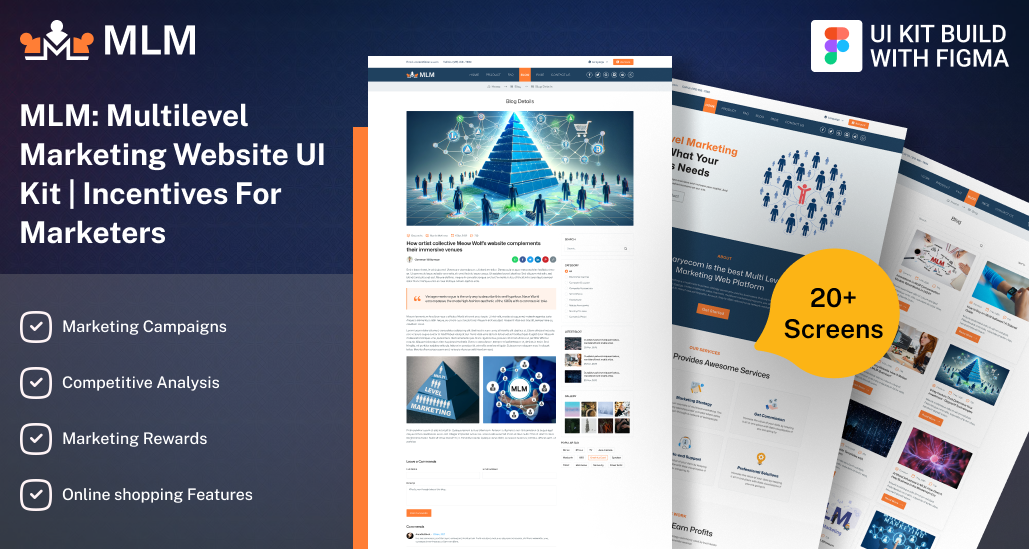
The MLM System UI Design includes:
-
Modern website pages
-
Authentication screens
-
User dashboards
-
Genealogy layouts
-
Wallet management
-
Reports
-
eCommerce interfaces
-
Responsive components
Its organized structure also makes collaboration between designers and developers much easier, helping projects move from design to development with fewer revisions.
Whether you're a startup founder, freelance designer, software company, or development agency, this UI kit provides a practical foundation for building a polished website and maintaining consistency across every screen.
Should You Go With Custom UI and UX Design for the Multi-Level Marketing Website?
A custom UI and UX design is the right choice if you're building an MLM platform with unique business requirements, custom workflows, and long-term scalability. Although it requires a higher initial investment, it reduces redesign and development expenses over time.
-
Tailored to Your MLM Business: A custom design reflects your compensation plan, branding, and user journey instead of relying on generic templates.
-
Improved User Experience: Well-planned dashboards, navigation, and forms make it easier for members to manage referrals, commissions, and purchases.
-
Lower Long-Term Development Costs: Organized, developer-ready Figma files reduce revisions, miscommunication, and coding errors to help save development time and budget.
-
Estimated Design Cost: A basic custom MLM UI/UX design typically costs $200-$500, while a medium-sized project ranges from $700-$1,500. Enterprise-level MLM platforms with extensive dashboards and modules can exceed $2,000+.
If you're looking for an affordable, developer-friendly solution, check out our custom UI/UX website design service. It delivers professionally organized Figma designs that help speed up development into a polished user experience.
FAQs
-
Why is Figma preferred for designing MLM websites?
Figma provides real-time collaboration, reusable components, and organized design systems that simplify communication between designers, developers, and stakeholders. It also speeds up approvals and reduces design inconsistencies before development begins.
-
Can an MLM website UI kit be customized for different compensation plans?
Yes. A well-designed multi-level marketing UI kit can be customized to support various compensation models, including binary, matrix, unilevel, board, and hybrid plans, without redesigning the entire interface from scratch.
-
What should be included in a multi-level marketing dashboard design?
An effective MLM dashboard should include earnings summaries, referral statistics, genealogy access, wallet balance, recent transactions, notifications, and quick links to commonly used features for a better user experience.
-
How does an organized Figma file improve project collaboration?
A structured Figma file makes it easier for designers, developers, and project managers to locate screens, review updates, leave comments, and implement changes, reducing confusion throughout the development process.
-
Should a multi-level marketing website be designed with future scalability in mind?
Absolutely. Planning scalable layouts, reusable components, and a flexible design system allows new features, dashboards, and modules to be added later without disrupting the existing user interface.