BTC - Bitcoin
 USDTERC20 - USDT ERC20
 ETH - Ethereum
 BNB - Binance
 BCH - Bitcoin Cash
 DOGE - Dogecoin
 TRX - TRON
 USDTTRC20 - USD TRC20
 LTC - LiteCoin

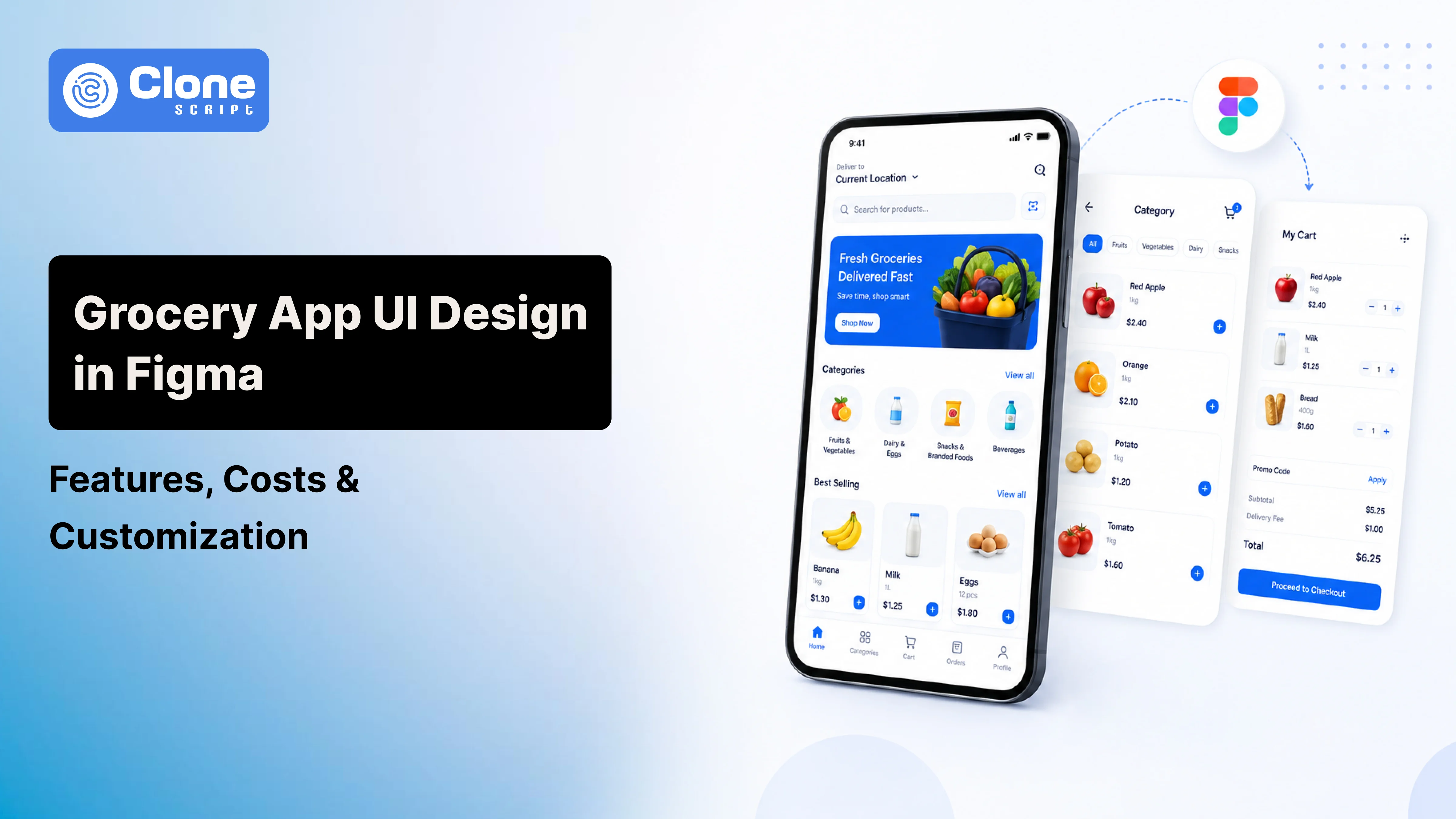
Grocery App UI Design in Figma: Features, Use Case, Customization
Consumers now expect simple navigation, personalized grocery product recommendations, one-tap checkout, live order tracking, and safe payment options.
User Experience has become a major competitive advantage, whether a startup launching a quick commerce platform or an established supermarket expanding digitally.
Before developers write a single line of code, successful businesses invest in designing the customer journey. Figma has become the preferred platform for creating grocery app interfaces because it enables rapid prototyping, collaborative design, and developer-ready assets.
Starting with a professionally designed UI also helps businesses validate ideas faster and reduce design revisions during front-end app development.
In this guide, you'll learn the essential features every grocery app UI should include, business use cases, customization possibilities, estimated design costs, and why using a ready-made Figma design can significantly accelerate your project.
Why Businesses Start with a Figma Grocery App Design?
Your client asked you to deliver the grocery e-commerce app within a single month. You say, let’s do it. Then, reality comes in. The design team is managing multiple projects at a time, and it’s not possible to outsource the work. Here, the Figma app design works.
From that, everything in the app development lifecycle is managed smoothly, like coding, testing it, and deploying it on the app store.
-
Faster Project Planning
Do not spend weeks discussing and approving the layouts and navigation. With the Figma UI kit, you can show a business a complete visual prototype. Stakeholders gain a clear understanding of the product before development begins, reducing misunderstandings.
-
Lower Design Costs
Hiring UI/UX designers for an entirely custom interface can substantially increase project budgets. Purchasing a professionally designed Figma template provides a solid starting point and allows businesses to invest more in core application features.
-
Easier Developer Collaboration
Modern Figma files include organized layers, reusable UI components, Auto Layout, and design systems that developers can easily interpret. This reduces implementation errors and speeds up front-end development.
-
Better MVP Development
Startups need to launch quickly to validate their business model. Beginning with a ready-made UI enables teams to release a minimum viable product faster and maintain a polished user experience.
-
Simplified Customization
Colors, typography, branding, icons, and layouts can all be modified without redesigning every screen. Businesses maintain flexibility and save significant design time.
Prioritize These Key Features in a Grocery App Figma Design
A grocery delivery application should provide a frustration-free shopping experience from the moment users open the app until their order arrives.
| Feature | Why It Matters |
|---|---|
| Splash & Onboarding | Creates a strong first impression and introduces app features |
| Login & OTP Verification | Enables secure and convenient user authentication |
| Home Dashboard | Highlights categories, offers, and recommended products |
| Product Categories | Helps customers quickly locate items |
| Smart Search | Makes finding products effortless |
| Filters & Sorting | Improves shopping efficiency for large catalogs |
| Product Detail Page | Displays descriptions, pricing, nutrition, and stock availability |
| Wishlist | Encourages repeat purchases |
| Shopping Cart | Lets users review and modify purchases before checkout |
| Coupons & Promotions | Increases conversions through discounts |
| Secure Checkout | Simplifies order completion |
| Address Management | Supports multiple delivery locations |
| Payment Options | Accommodates customer preferences |
| Order Tracking | Provides real-time delivery updates |
| Notifications | Keeps users informed about promotions and orders |
| User Profile | Stores preferences and account details |
| Order History | Enables quick reordering |
| Ratings & Reviews | Builds trust and improves purchasing decisions |
Together, these features create a shopping experience that customers already expect from modern grocery delivery platforms.
Advanced Features Modern Grocery Apps Should Consider
Customer expectations continue to evolve, making advanced functionality increasingly valuable for businesses seeking long-term growth.
-
AI Product Recommendations
This feature helps suggest complementary products based on purchase history, increasing average order value and improving customer satisfaction.
-
Voice Search
Voice-enabled product searches make shopping more convenient, especially for returning customers purchasing everyday essentials.
-
Quick Reorder
Customers frequently purchase the same grocery items. A quick reorder option significantly reduces shopping time.
-
Subscription Orders
This type of feature is important, as weekly or monthly recurring deliveries generate predictable revenue while improving customer retention.
-
Delivery Scheduling
This advanced feature allows customers to choose delivery slots, improving operational planning and customer convenience.
-
Loyalty Programs
Offering reward points, cashback, and exclusive discounts encourages repeat purchases. This feature has to exist on the app.
-
Multi-language Support
Businesses serving diverse regions can improve accessibility through localized interfaces. Integrating multilingual support in the app can enhance usability.
-
Live Inventory Indicators
Displaying stock availability reduces customer frustration caused by unavailable products. That means they can identify alternative products for consumption.
-
Dark Mode
Dark themes improve accessibility and offer a modern visual experience. This can also help customers order products without eye strain.
-
Smart Notifications
Personalized reminders about abandoned carts, promotions, and reorder suggestions increase engagement. For that reason, your app can manage the entire marketing and encourage product purchases.
Grocery App UI Design Business Use Cases
Different grocery businesses require different user experiences. A customizable Figma design provides flexibility for multiple business models.
-
Grocery Delivery Startups
Startups need an attractive interface that supports rapid product launches. A ready-made UI helps founders validate ideas without investing heavily in custom design.
-
Supermarket Chains
Established retailers can digitize their existing operations and maintain consistent branding across mobile platforms.
-
Hyperlocal Delivery Platforms
Businesses delivering groceries within limited geographic areas, like hyperlocal businesses in India, can benefit from location-based interfaces, live delivery tracking, and fast checkout experiences.
-
Multi-Vendor Grocery Marketplace
Marketplace operators require vendor onboarding, multiple product catalogs, and centralized customer management. A flexible UI can accommodate these complex workflows.
-
Organic Grocery Stores
Organic retailers emphasize product origin, nutritional information, certifications, and subscription purchases. Their interface should highlight these unique selling points.
-
Wholesale Grocery Suppliers
Wholesale businesses need bulk ordering interfaces, quantity-based pricing, and business account management with minimal effort.
-
Subscription Grocery Services
Recurring grocery deliveries require subscription management, delivery scheduling, payment automation, and account controls integrated into the overall user experience.
How a Figma Grocery UI Accelerates App Development?
A professionally designed interface simplifies the entire software development lifecycle.
-
Business Idea
-
Wireframes
-
UI Design in Figma
-
Interactive Prototype
-
Developer Handoff
-
Front-end Development
-
Back-end Integration
-
Testing
-
Application Launch
Skip repeatedly redesigning screens during development, developers work from approved interfaces. Organized components, reusable layouts, and standardized design systems reduce implementation effort and improve consistency across the application.
This structured workflow helps businesses reduce project timelines and launch products more efficiently.
Grocery App UI Design Customization Options
Every grocery business operates differently. Customization ensures the interface aligns with specific operational requirements.
-
Branding
Businesses can replace logos, adjust brand colors, select typography, and personalize visual elements without redesigning the application.
-
Business Models
The interface can be adapted for:
-
Single grocery store
-
Multi-vendor marketplace
-
Hyperlocal delivery
-
Chain supermarkets
-
Wholesale suppliers
-
Delivery Models
Businesses may customize screens for:
-
Instant delivery
-
Scheduled delivery
-
Store pickup
-
Click-and-collect
-
Subscription deliveries
-
Customer Features
Additional modules may include:
-
Digital wallets
-
Membership plans
-
Referral programs
-
Loyalty rewards
-
Coupon management
-
Navigation
Menus, bottom navigation, category layouts, and product listings can all be reorganized to suit customer behavior.
-
Administrative Requirements
Enterprise businesses require dashboards supporting inventory management, vendor administration, customer analytics, and promotional campaigns.
Why Ready-Made Grocery App UI is Better Than Designing from Scratch?
Know the differences between a complete app UI and custom design:
| Ready-Made Figma UI | Designing from Scratch |
|---|---|
| Lower initial investment | Higher design costs |
| Faster project kickoff | Longer planning phase |
| Professionally organized files | Design quality depends on the team |
| Quicker MVP launch | Extended timelines |
| Easier stakeholder approval | Multiple revision cycles |
| Faster developer handoff | Additional documentation required |
| Easy customization | Everything built from zero |
For businesses focused on entering the market quickly, starting with a professionally designed UI often provides a better return on investment.
GoGrocer Grocery App UI Design in Figma
The GoGrocer Grocery App UI Design in Figma offers a ready-to-customize interface that helps businesses move from idea to development more efficiently. Key highlights include:
-
Complete Shopping Screens: Includes all essential screens required for a seamless grocery shopping experience, from onboarding to order tracking.
-
Business-Ready Design: Suitable for grocery startups, supermarkets, hyperlocal delivery services, and multi-vendor grocery marketplaces.
-
Fully Customizable UI: Easily modify colors, typography, logos, icons, and layouts to reflect your brand identity.
-
Developer-Friendly Structure: Features well-organized layers and components that simplify the handoff between designers and developers.
-
Supports Feature Expansion: Allows businesses to add custom modules such as loyalty programs, subscriptions, wallets, and referral systems.
-
Accelerates App Launch: Reduces UI design time, enabling businesses to begin development and launch their grocery app more quickly.
-
Scalable for Future Growth: Provides a flexible design foundation that can evolve with changing business requirements and customer expectations.
-
Cost-Effective Solution: Helps reduce UI/UX design costs while maintaining a professional and modern mobile app interface.
Integrate This App Design System
When Should You Customize Instead of Using the Design As-Is?
A ready-made UI provides an excellent foundation, but some businesses require additional customization.
Customization is recommended if your business needs:
-
Enterprise supermarket management
-
Multiple country support
-
Franchise operations
-
AI-powered recommendations
-
ERP integration
-
Warehouse automation
-
Advanced loyalty systems
-
White-label deployments
-
Multiple delivery partners
-
Vendor commission management
Rather than redesigning the entire application, businesses can customize an existing interface while preserving its core design structure. This approach reduces both project duration and development costs.
Cost of Grocery App UI Design in Figma
The overall investment depends on project complexity and customization requirements.
| Requirement | Estimated Cost |
|---|---|
| Basic Figma UI Kit | $20-$100 |
| Premium UI Kit | $100-$200 |
| Custom Grocery App UI | $750-$1,500+ |
| UI with Interactive Prototype | $1,500-$2,000+ |
| Complete Grocery App Development | $2,000-$20,000+ |
Purchasing a professionally designed UI represents a small percentage of the total development budget while delivering significant time savings.
Grocery App UI Best Practices Before Buying
Before selecting a Figma design, evaluate whether it includes:
-
Organized layer structure
-
Auto Layout support
-
Reusable components
-
Design system
-
Responsive layouts
-
Clickable prototype
-
Developer-friendly organization
-
Editable icons
-
Well-structured typography
-
Commercial usage rights
-
Easy scalability for future features
Choosing a high-quality design file reduces future redesign work and creates a smoother transition into development.
Conclusion
Launching a successful grocery delivery application requires more than attractive visuals. Every screen should support efficient shopping, simple navigation, secure checkout, and long-term scalability. Starting with a professionally designed Figma UI allows businesses to validate ideas, reduce design costs, accelerate development, and create a consistent customer experience.
For startups, supermarkets, and enterprises planning to build or modernize a grocery delivery platform, using a customizable solution like the GoGrocer Grocery App UI Design in Figma provides a practical foundation while leaving room for branding, feature expansion, and future business growth.
FAQs
-
Can a Figma grocery app design be converted into Android and iOS applications?
Yes. Figma provides the visual interface and design specifications, while developers use those assets to build native or cross-platform mobile applications.
-
Is a grocery app UI enough to start development?
A UI design serves as the frontend blueprint. Complete application development also requires backend systems, databases, APIs, payment integration, authentication, and testing.
-
How long does customizing a grocery app UI usually take?
Minor branding updates may take only a few days, while extensive customization involving new workflows and enterprise features can take several weeks.
-
Can one grocery app UI support a multi-vendor marketplace?
Yes. A well-structured Figma design can be customized to include vendor dashboards, commission management, multiple stores, and separate product catalogs.
-
Does a Figma grocery app include interactive prototypes?
Many professional Figma files include clickable prototypes that demonstrate user navigation and shopping workflows before development begins.
-
Can developers work directly from Figma?
Yes. Developers can inspect layouts, measurements, typography, colors, and assets directly within Figma, making frontend implementation faster and more accurate.
-
What should businesses check before purchasing a grocery app UI?
Look for organized components, Auto Layout support, reusable design systems, responsive screens, editable elements, prototype availability, and licensing terms to ensure the design can be efficiently customized for your project.