BTC - Bitcoin
 USDTERC20 - USDT ERC20
 ETH - Ethereum
 BNB - Binance
 BCH - Bitcoin Cash
 DOGE - Dogecoin
 TRX - TRON
 USDTTRC20 - USD TRC20
 LTC - LiteCoin

Open Source Vs Commercial Software: Understand Its Complete Differences
When making a complete platform for logistics, an e-commerce website or gaming application, or enterprise software, the first question is: does open source work for me, or can commercial software be enough? Look, the software you choose affects development costs, customization, security, scalability, maintenance, and business growth.
Open source software is an affordable option; this is the thinking of many businesses. Other thinks a commercial software offers support and security. The reality is different. What your project requirements are, how many resources you have, technical expertise your team brings decide what to select.
The difference between open source and proprietary software helps make informed tech decisions by not just focusing on licensing costs. Before investing in a software solution, ownership, flexibility, vendor support, compliance, and total cost have to be considered by startups to large enterprises.
What Is Open Source Software?
Open source software is a one kind of software whose source code is publicly available for anyone to view, modify, and distribute under the terms of its license. Here, businesses and developers are not restricted to using only the features provided by a single vendor as proprietary software. They can customize the software to meet specific business requirements, integrate it with other systems, and extend its functionality.
Famous Examples of Open Source Software
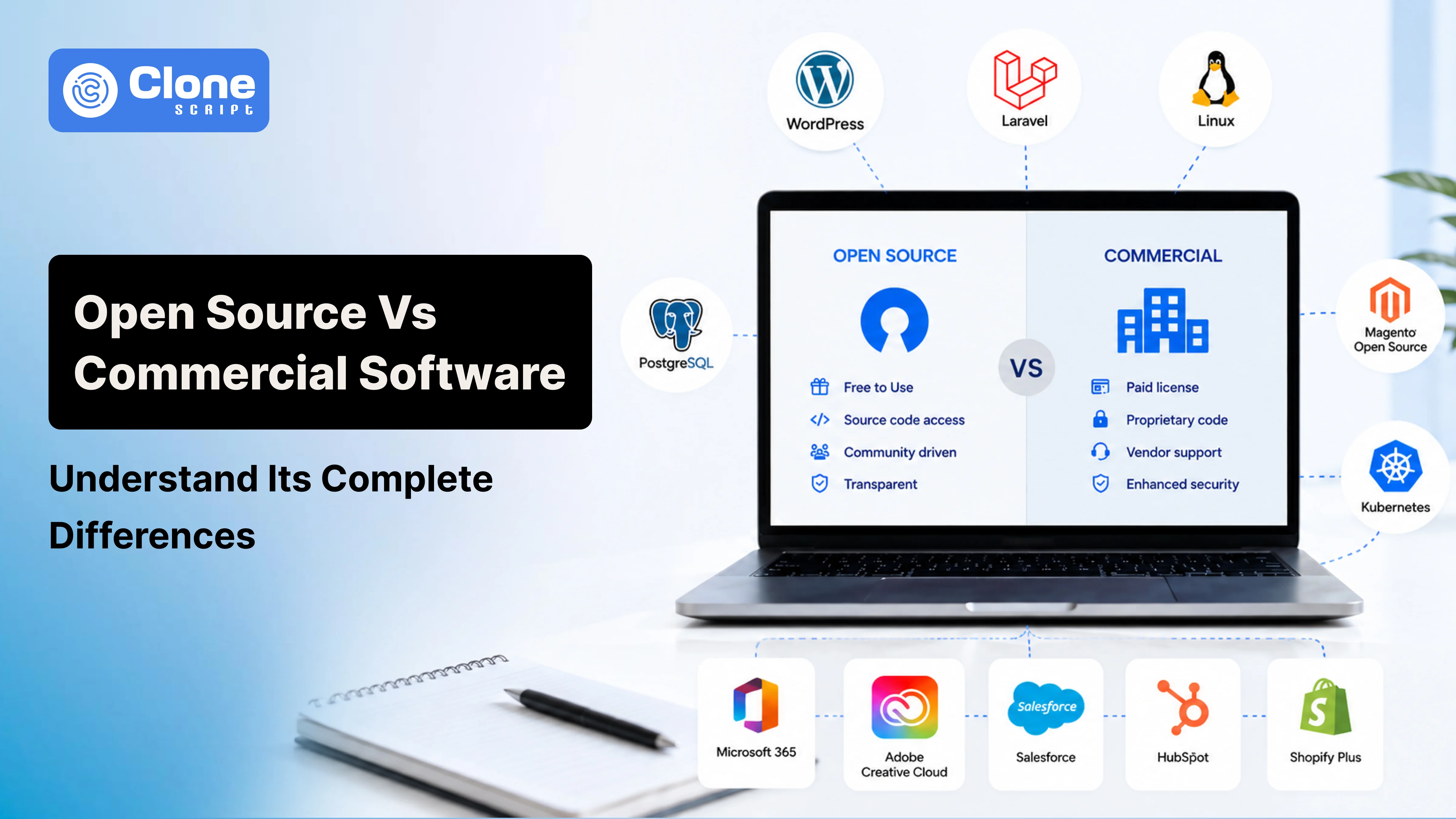
Some of the most widely used open-source software include:
-
WordPress: Content management system for websites and blogs.
-
Laravel: PHP framework for custom web application development.
-
Linux: Open-source operating system widely used on servers and cloud infrastructure.
-
PostgreSQL: Enterprise-grade relational database.
-
Magento Open Source: eCommerce platform for customizable online stores.
-
Kubernetes: Container orchestration platform for managing cloud-native applications.
These technologies power millions of websites and business applications worldwide, demonstrating that open source software is capable of supporting projects ranging from small business websites to enterprise-scale digital platforms.
What Is Commercial Software?
Commercial software is software that has been separately developed, owned, and distributed by a company for commercial purposes. To utilize this software, individuals or businesses purchase a license or subscribe to a monthly or annual plan. In commercial software, the source code is not publicly available, so users cannot modify or redistribute the software without the vendor’s permission.
Famous Examples of Commercial Software
Some of the most commonly used commercial software includes:
-
Microsoft 365: Productivity and collaboration suite for businesses.
-
Adobe Creative Cloud: Professional design, video editing, and creative software.
-
Salesforce: Cloud-based customer relationship management (CRM) platform.
-
HubSpot: Marketing, sales, and customer service platform.
-
Shopify Plus: Enterprise eCommerce platform with managed infrastructure.
Commercial software is commonly chosen by businesses that prioritize vendor support, ease of deployment, compliance, and predictable maintenance over complete control of the source code.
Open Source Vs Commercial Software: Key Differences
Choosing between open source and commercial software involves more than comparing licensing costs. Businesses should evaluate how each software model performs across customization, security, scalability, support, maintenance, and long-term ownership.
| Comparison Factor | Open Source Software | Commercial Software |
|---|---|---|
| Source Code | Publicly available and can be viewed, modified, and distributed according to the license. | Privately owned by the vendor and not accessible to users. |
| Licensing | Uses open-source licenses such as GPL, MIT, or Apache. | Requires a paid license or subscription agreement. |
| Initial Cost | Generally free to acquire, but implementation costs apply. | Requires an upfront payment or recurring subscription. |
| Customization | Highly customizable to meet specific business requirements. | Limited to the features and customization options offered by the vendor. |
| Development Flexibility | Developers can modify the code, build custom features, and integrate third-party tools. | Changes depend on the vendor's roadmap and available APIs. |
| Support | Community forums, documentation, or third-party development partners. | Dedicated customer support, training, and Service Level Agreements (SLAs). |
| Security | Security depends on timely updates, code quality, and maintenance by the development team. | Security updates and patches are managed by the software vendor. |
| Updates | Community-driven or managed by your internal development team. | Released on the vendor's schedule. |
| Scalability | Can be scaled and optimized with custom development. | Scalability depends on the vendor's infrastructure and licensing plans. |
| Maintenance | Handled by your team or development agency. | Primarily managed by the software provider. |
| Vendor Dependency | Lower dependency on a single vendor, but may rely on implementation partners. | Higher dependency on the software vendor for updates, support, and licensing. |
| Integration | Easily integrates with custom applications and open APIs. | Integration options are limited to supported APIs and connectors. |
| Compliance | Businesses are responsible for meeting regulatory and security requirements. | Many enterprise solutions include built-in compliance and governance features. |
| Best Suited For | Custom software, enterprise applications, startups, and businesses requiring complete control. | Organizations seeking faster deployment, predictable support, and managed solutions. |
This comparison highlights the major differences; neither option is universally better. The right choice depends on your business objectives, technical expertise, budget, compliance needs, and long-term software strategy.
Real Cost Beyond License Fees in Open-source and Commercial Software
Licensing costs are only one part of the investment when comparing open-source and commercial software. Businesses should evaluate the total cost of ownership before making a decision.
-
Initial Investment
Open-source software is usually free to download. But implementation and customization costs can be high. Another side, commercial software requires a license or subscription, which includes essential services.
-
Ongoing Maintenance
In open-source, businesses have to manage updates, security patches, hosting, and maintenance. In commercial software, vendors take on the liability to handle these things with regular updates and support.
-
Long-Term Business Value
For highly customized projects, open-source software delivers the flexibility. Faster deployment, predictable costs, and dedicated vendor support are available in commercial software. Just focusing on the upfront price, we recommend comparing the software’s long-term value over its lifecycle to completion.
Customization and Flexibility: Another Essential Factor
Business product and service requirements are different from one another. Some always need a ready-to-use solution, others require software for their workflows, integrations, and customer experience.
-
Open Source Software Offers Greater Flexibility.
Having a source code accessibility, open-source software can help to modify features, build custom modules, integrate third-party tools, and optimize performance. For a business with unique processes or long-term scalability goals can be managed.
-
Commercial Software Prioritizes Convenience.
Commercial software is designed to work out of the box with minimal setup. Most vendors provide configurable settings, built-in integrations, and add-ons, but deep customization is limited to protect the platform's stability and maintainability.
Which Option Should You Choose?
Choose open-source for:
-
Project needs extensive customization
-
Custom integrations
-
Complete control over the application’s functionality
Choose commercial software for:
-
Faster deployment with minimal development effort
-
More streamlined and managed experience
This clarifies what should be prioritized to get the software in use.
Security and Compliance: Keep Software Safe for Everyone
Security is a deciding factor when choosing between open-source and commercial software. Many assume commercial software is more secure; both options can provide strong protection when managed properly.
-
Security in Open Source Software: Maybe risky.
Open-source software benefits from transparent code that can be reviewed by developers worldwide. However, businesses are responsible for applying security patches, monitoring vulnerabilities, and keeping dependencies up to date.
-
Security in Commercial Software: Not too risky.
Commercial software vendors regularly release security updates, fix vulnerabilities, and provide dedicated support. Many enterprise solutions also include compliance features for standards such as GDPR, HIPAA, or ISO 27001. This is suitable for regulated industries.
Which Is More Secure?
Security depends less on the software model and more on how it is maintained. An actively maintained open-source solution can be just as secure as commercial software. Neglected software, regardless of its type, can expose businesses to unnecessary risks.
Support and Maintenance: Don’t Play With It
Reliable support and regular maintenance are essential for keeping software secure, stable, and up to date. The level of support you receive largely depends on whether you choose open source or commercial software.
-
Support for Open Source Software: Depends on others.
Open-source software depends on community forums, documentation, and third-party development agencies for support. Businesses with an in-house development team can resolve issues quickly, while others may partner with experienced agencies for ongoing maintenance.
-
Support for Commercial Software: Exists anytime.
Commercial software vendors provide dedicated customer support through email, phone, or live chat. Many also offer Service Level Agreements (SLAs) for faster response times, regular updates, and technical assistance when issues arise.
Which Option Is Better?
-
If your business has technical expertise and requires flexibility, open-source software provides multiple support options.
-
However, if guaranteed assistance, faster issue resolution, and predictable maintenance are priorities, commercial software is often the better choice.
This affects the software product development workflow.
Vendor Lock-In and Software Ownership: Two Key Elements
Businesses should consider who controls the software long after it has been deployed. Software ownership affects future upgrades, migrations, and the ability to switch development partners.
-
Ownership in Open Source Software: Freedom of choice.
With open-source software, businesses have access to the source code and can work with any qualified developer or agency. This reduces dependency on a single software vendor and provides greater flexibility for future enhancements.
-
Ownership in Commercial Software: Dependency.
Commercial software is owned by the vendor. Businesses purchase the right to use the software but do not own its source code. As a result, customization, feature requests, and migrations depend on the vendor's policies and product roadmap.
Think Beyond Vendor Lock-In
Vendor lock-in isn't limited to commercial software. An open-source project can also create dependency if custom code is poorly documented or maintained by a single developer or agency. Choosing experienced development partners and maintaining proper documentation can help businesses avoid long-term risks regardless of the software model.
Consider a Hybrid Approach for Open-Source and Commercial Software
Many modern businesses use both open-source and commercial software. For example, a company may build its website with WordPress or Laravel while using Salesforce for CRM, Microsoft 365 for collaboration, and HubSpot for marketing automation. This approach combines the flexibility of open-source software with the reliability and support of commercial platforms.
Conclusion
The debate around open-source and commercial software is choosing the solution that best fits your business needs. Open-source software offers flexibility, customization, and greater control. Commercial software provides dedicated support, predictable maintenance, and faster deployment.
Before making a decision, evaluate your project requirements, budget, technical expertise, security expectations, and long-term growth plans. Looking beyond the initial cost and considering the total cost of ownership will help you make a more informed investment.
If you're planning a web development project, partnering with an experienced development agency can help you assess both options and recommend the software that aligns with your business goals, ensuring a scalable, secure, and future-ready solution.