BTC - Bitcoin
 USDTERC20 - USDT ERC20
 ETH - Ethereum
 BNB - Binance
 BCH - Bitcoin Cash
 DOGE - Dogecoin
 TRX - TRON
 USDTTRC20 - USD TRC20
 LTC - LiteCoin

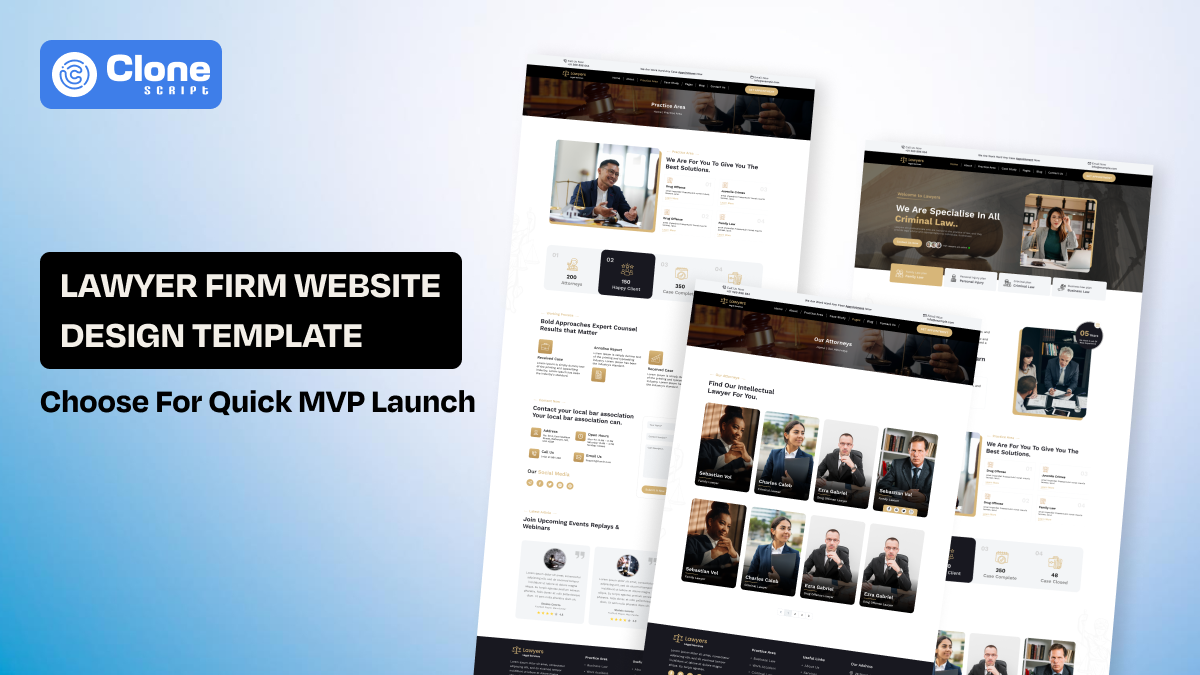
Lawyer Firm Website Design Template: Why to Choose for Quick MVP Launch
In legal service consultation, trust is everything, and a website is also a main factor. Making a credible website for a law firm is a very challenging task, especially in design. So, the Minimal Viable Product (MVP) is the right way to reduce risk and get expected ROI. Choosing the ready-designed templates works ideally for both businesses and development teams.
This article explains what an MVP website looks like for law firms, which pages and features matter at launch, and how design and development teams can use structured website templates to reduce delivery time without compromising quality or flexibility.
5 Essential Pages Every Law Firm Website Template Must Include
Whether you prefer a template marketplace or individual provider, make sure the templates support these necessary pages with designed elements:
-
Home Page
The professional homepage sets the expectations and guides visitors on what to do next. It also lets them know what the law firm does, what the service areas are, and how to get in contact. To go with the MVP launch, the page has to be structured accordingly to showcase the clear message in a hero section, a visible call to action, and an optimized layout. Here, we recommend that design teams prioritize hierarchy and readability over decorative elements.
-
About the Firm
People start interacting with the attorneys after they understand the mission and vision of the firm. The “About the firm page” defines it accordingly and provides context and credibility. At the MVP stage, never try to add full history or long narratives. A concise overview in a proper format is enough. Structure this page in a way that feels human and professional, not corporate or promotional.
-
Practice Areas
What kind of legal practices the firm provides can be recognized through this page. For example, law firms provide taxation, criminal, corporate, and other types of services. Check that the template has modular design layouts because it helps in development to build sections using reusable components rather than fixed pages.
-
Attorney Profiles
Even at the MVP stage, attorney profiles matter. Clients want to know who they may be working with. These pages should be structured, consistent, and easy to extend over time. The portfolio of attorneys has to be represented in a simple and easy-to-understand way. A good template supports simple bios at launch and room for detail later without redesign.
-
Contact Page
On a legal service-providing website, the contact page works as the lead generation tool. This page has to be made with simplicity and functionality. Forms, phone numbers, and location details can easy to find and used, especially on mobile devices. Overdesigning this page affects conversions. MVP templates should keep it straightforward and fast-loading.
Focusing on these five pages helps teams avoid overbuilding early while still delivering a website that feels complete, credible, and ready to grow.
Why MVP Website Development Works for Legal Businesses?
Law firm websites move faster and perform better when built as MVPs, focusing on essential pages, real user behavior, and early launch instead of delayed, overbuilt designs.
-
Law Firm Websites Usually Stall Before They Launch.
Law firm websites rarely stall because of design or development challenges. They stall because decisions take time. Here’s the overview:
-
Content approvals move slowly
-
Legal language changes
-
Multiple stakeholders need to sign off.
An MVP approach works because it helps teams launch with what is approved instead of waiting for everything to be final.
-
Visitors Do Not Read Legal Websites the Way Firms Expect.
Most visitors do not read law firm websites in detail. They scan. They want to confirm the firm handles their problem, appears trustworthy, and is easy to contact. MVP websites are designed around these actions, not long-form explanations that usually get read.
-
MVP Keeps Projects Moving Instead of Perfecting Details.
This way, the law firm website design keeps projects moving. Designers focus on structure and clarity instead of over-polishing. Developers build only what is needed to support real use. Stakeholders see progress early, which reduces late-stage changes. Everyone achieved their goals, as they expected.
-
Launching Early Has Real Business Benefits.
A live website can start appearing in search results, collect inquiries, and show what content actually matters. It is far easier to improve a working site than to keep refining one that has not been launched. This saves time and resources from being wasted and provides a more agile solution.
For law firms, MVP development is not about cutting quality. It is about launching faster, learning sooner, and improving based on real usage rather than assumptions.
How Lawyer Website Design Templates Enable Quick MVP Launch?
In website development, there are multiple tasks like layout planning, front-end coding, back-end programming, and testing involved. Using a well-structured lawyer website template removes the most time-consuming parts of web projects, especially UI and UX design. Design decisions are already tested and optimized. It means teams can now focus on content and deployment.
Templates designed specifically for legal websites typically include:
-
Pre-built page layouts aligned with legal user journeys.
-
Consistent typography and color systems.
-
Responsive UI components for mobile and tablet.
-
Clear CTA placement based on conversion best practices.
When it comes to customization in terms of branding, the Figma UI kit templates also become helpful. Developers benefit from predictable components, reducing rework and speeding up implementation.
Product Spotlight: Law Firm Website Figma Design Template
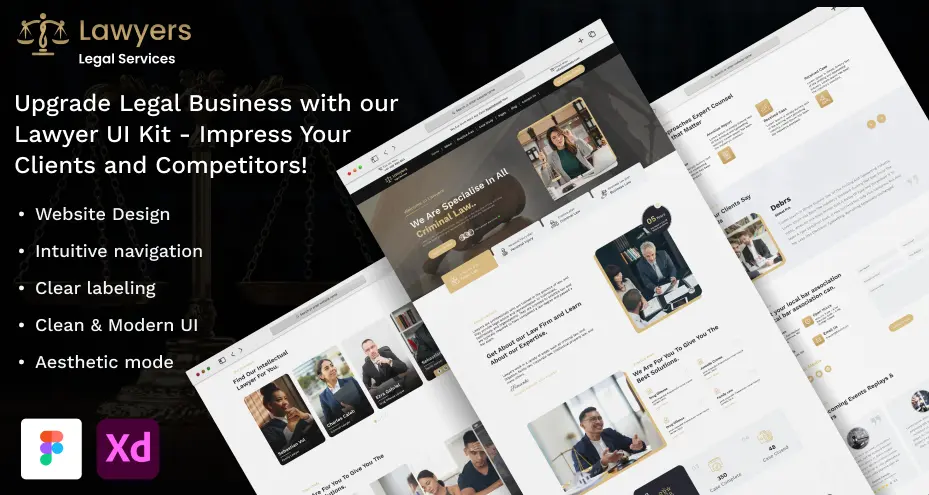
For teams looking to accelerate MVP delivery, the law firm website Figma design template available at AllCloneScript offers a practical, developer-ready solution.
This law firm UI kit is built specifically for legal websites and supports fast go-live without sacrificing professionalism. Key benefits of this template include:
-
Structured layouts for core law firm pages.
-
Clean, modern legal design aligned with trust-building principles.
-
Fully editable Figma components for rapid customization.
-
Developer-friendly design system for smooth handoff.
By using this solution, teams can shorten design timelines, reduce back-and-forth revisions, and launch client-ready MVPs efficiently.
What Key Features to Look for in a Law Firm Website Design Template?
When selecting a law firm website design template, teams make a choice that only looks good in previews. A useful template should reduce effort during real projects, not add more work later.
-
Pre-Designed Homepage Layouts
The template includes ready-made homepage structures with clear hero sections, service highlights, trust signals, and call-to-action placements. Using them, teams can launch a website quickly without debating layout fundamentals or conversion flow.
-
Practice Area Page Sections
A separate layout for legal services can make the task easier for presentation. Firms can showcase their expertise in such legal services and generate leads from there. In templates, the sections are designed to be expanded over time. When a new service is added, the page structure is maintained.
-
Attorney Profile Layouts
One of the best parts of design templates for a law website is that they offer ready-made layouts for the attorney profiles. To showcase credentials, experience, and areas of expertise professionally is becoming easy. Separate layouts for individual attorneys make it easy to add, update, or reorganize team members as the firm grows.
-
About Firm Page Structure
The structure of the About firm page matters for conversions because visitors are eager to know additional details. Presenting the history, values, certifications, and achievements interestingly increases the call-back sessions with attorneys. This helps establish credibility early without requiring custom storytelling layouts.
-
Contact and Consultation Forms
The template includes contact and inquiry form designs optimized for lead capture. These layouts reduce friction for potential clients and integrate smoothly into MVP launches. The input fields and other relatable assets, including texts and images, are designed with a privacy focus.
-
Modular Page Components
Reusable sections allow designers and developers to add, remove, or rearrange content without redesigning entire pages. This flexibility supports fast iterations during MVP validation. The work follows an agile methodology that improves overall productivity.
-
SEO-Friendly Content Structure
Pages are organized with clean heading hierarchies, and logical content flow can help in the search rankings. The search bot prioritizes the user experience and accessibility. As the SEO-friendly page structure is already built, there is no need to restructure.
-
Responsive Layouts
All layouts are designed to work consistently across desktop, tablet, and mobile devices. This keeps usability for legal clients regardless of how they access the site. Also, the work of developing a website for separate devices is simplified with cross-platform development.
-
Accessibility-Ready Design
Spacing, typography, and layout decisions support accessibility best practices. This is important for you to meet modern usability expectations and avoid common compliance issues in the legal service provider website design.
-
Navigation and Header Components
Pre-built header, footer, and menu layouts provide clear site navigation. These components are designed to scale as new pages are added. This is an advantage of choosing the templates as basic components not need to be designed.
-
Call-to-Action Components
Consistent CTA buttons and sections guide users toward consultations or contact actions. This helps maintain conversion clarity across the site. You help both firms to get leads like legal consultancy bookings and users to find relevant services for their requirements.
-
Figma-Based Design System
All components are organized within a structured Figma design system. This keeps visual consistency, speeds up collaboration, and simplifies developer handoff during fast MVP builds. It brings a smart way to make a law firm website in a minimal timeline and with professional practices.
These features make your task for web design optimized and help to achieve the client's goals.
Lawyer Website Template vs Custom Design: What Works Best for MVP?
There are two ways for law firm website design, and here’s the difference.
|
Feature / Cost Component |
Template-Based Law Firm Site |
Custom Design Website |
|---|---|---|
|
Typical Design Cost |
$200 – $5,000 |
$5,000 – $40,000+ |
|
Time to Launch |
1–4 weeks |
8–16+ weeks |
|
SEO & Content Setup |
Basic included or add-on |
Custom SEO strategy included |
|
Unique Branding |
Limited |
Owned |
Scalability |
Moderate, component-based |
High, made for long-term growth |
|
Best For |
Early MVP, budget projects |
Growth-stage or established firms |
|
Hosting + Domain |
$100–$300/year |
$100–$300/year |
|
Ongoing Maintenance |
Optional |
Recommended |
How to Interpret These Costs?
-
Template Option:
It is best for MVP launches where speed, cost control, and validation are priorities. Agencies sell 5–10 page sites in this range by selecting a template and customizing it for the client.
-
Custom Design:
It is recommended that the firm confirm its market position and needs distinct branding, advanced features, or strategic SEO baked into the build. Costs rise with pages, integrations, and bespoke components.
What is a Developer Workflow for Building a Law Firm Website Using a Template?
By following the workflow help developers can help make a branded law firm website with a template in a simplified and proper way:
Step 1: Design Customization in Figma
At this step, designers have been given the lawyer website Figma UI template, where assets and components with layouts are presentable. Then they started customization according to brand goals. This includes changing colors, typography, and other imagery assets. The best thing about a component-based template reduces the rework.
Step 2: Content Mapping
This second step is to change the content as per the firm’s core work expertise and portfolio. Designers can showcase practice areas, attorney profiles, CTAs, and legal disclaimers that are aligned with existing layouts. So, they avoid last-minute layout changes and scope expansion.
Step 3: Front-End Development
Customization in design is done, and also content placement, then a front-end website development is initiated. Developers translate approved designs into code using consistent spacing, typography, and responsive rules. Standardized components make it easier to maintain visual consistency and cross-device compatibility.
Step 4: Back-End Integration
Once the front-end is in place, developers integrate the back-end. This includes connecting contact and consultation forms, setting up CMS structures, and handling form submissions. The configuration of email notifications and the implementation of basic security measures are part of this back-end development. Using a template simplifies data flow because required inputs and interactions are already defined.
Step 5: Testing and Quality Assurance
Before launch, the site goes through QA & testing. This includes functional testing, responsive testing, and basic performance checks. To identify whether forms, navigation, content rendering, and accessibility elements are working properly or not, it is required.
Step 6: MVP Launch
Here at this stage, the website is deployed on the servers and is live on the web with core pages, analytics, and tracking tools. Developers focus on stability and data collection rather than feature completeness.
Step 7: Iteration and Optimization
Post-launch insights guide improvements, new sections, or feature enhancements. Because the foundation is template-based, updates can be made without disrupting the overall structure. This keeps future changes efficient and controlled.
This workflow minimizes re-work, improves delivery predictability, and keeps design, development, and QA teams aligned throughout the project lifecycle.
Conclusion
Choosing MVP for a law firm website helps agencies and legal businesses to launch faster without sacrificing credibility, usability, or scalability. Integrating essential pages, using structured templates, and reusable components, development teams reduce risk. They can maintain the professional standards expected in legal services. With a template-based workflow, they can manage design, development, testing, and iteration for early-stage validation.
FAQs
-
Why should law firms choose an MVP approach for website development?
Law firms should choose an MVP approach to launch faster, reduce upfront costs, and avoid delays caused by content approvals and stakeholder reviews. MVP websites allow firms to go live early, collect inquiries, and improve the site based on real user behavior instead of assumptions.
-
How long does it take to launch a law firm website using a template?
A law firm website built using a template typically launches within 1 to 4 weeks. This includes design customization, content mapping, development, testing, and deployment, making it significantly faster than custom design projects.
-
Is a template-based law firm website scalable for future growth?
Yes, template-based law firm websites are scalable when built with modular components. Development teams can add new practice areas, attorneys, pages, or features later without redesigning the entire site. It is ideal for MVP validation and gradual expansion.
-
What features should a law firm website design template include?
A law firm website template should include pre-designed homepage layouts, practice area sections, attorney profile pages, contact forms, modular components, SEO-friendly structure, responsive layouts, accessibility-ready design, and consistent call-to-action elements.
-
Are website templates suitable for professional law firm branding?
Yes, professional website templates designed for legal services support clean layouts, trust-focused design elements, and consistent typography. With tools like Figma UI design kits, templates can be customized to match a law firm’s branding without compromising professionalism.
-
Can MVP websites be improved after launch?
Yes, MVP websites are designed for iteration. After launch, firms can analyze user behavior, add new sections, refine content, and enhance features without disrupting the existing structure. The continuous improvement is efficient and low-risk.
-
7. How much does it cost to make a lawyer's website using a design template?
The cost to build a lawyer website using a design template typically ranges from $500 to $5,000, depending on customization, number of pages, and development support. A basic template setup costs less, while a professionally customized, template-based MVP website falls in the mid-range and is most common for law firms.