BTC - Bitcoin
 USDTERC20 - USDT ERC20
 ETH - Ethereum
 BNB - Binance
 BCH - Bitcoin Cash
 DOGE - Dogecoin
 TRX - TRON
 USDTTRC20 - USD TRC20
 LTC - LiteCoin

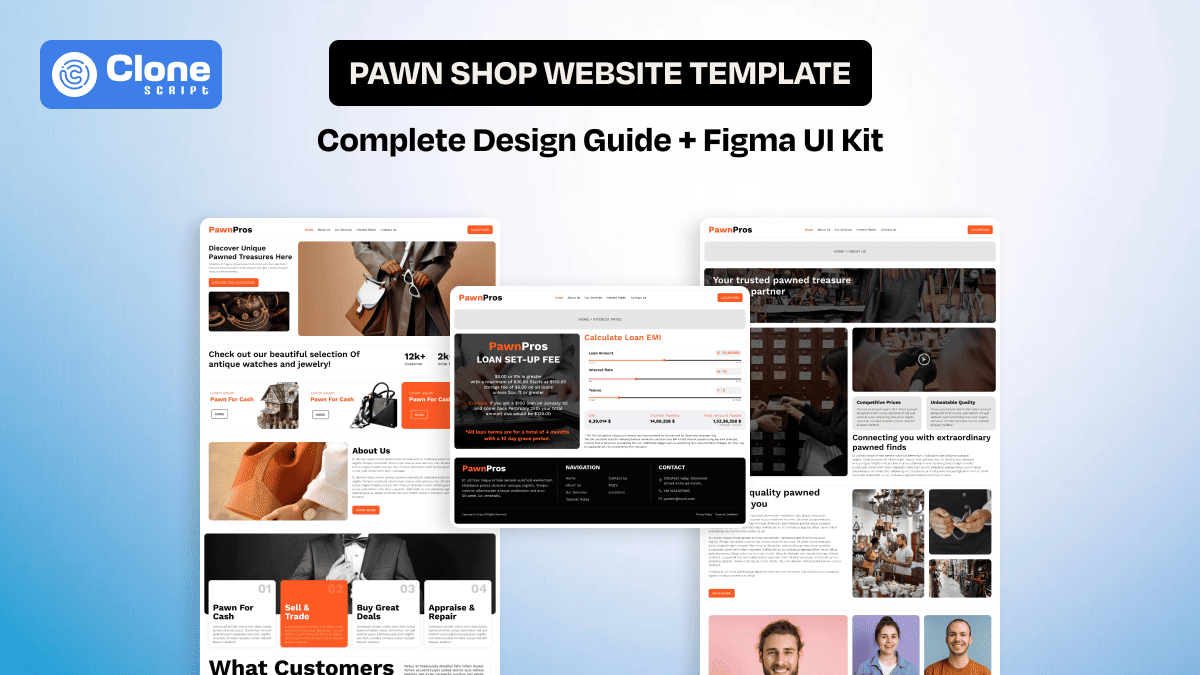
Pawn Shop Website Template: Complete Design Guide + Figma UI to Use in Development
Designing a pawn shop website is different from building a typical ecommerce layout. You are not just showcasing products. You are designing around trust, valuation, urgency, and local credibility.
A pawn business operates at the intersection of retail and short-term finance. Customers arrive with specific intent: sell an item, pawn it for cash, or purchase discounted goods. That urgency changes how the interface should behave.
For developers and UI designers, the challenge is clear. The website must feel secure, organized, and transparent while remaining flexible enough to handle constantly changing inventory.
This guide explains how to structure a professional pawn shop website design, what user interface components actually matter, and how a purpose-built Figma UI template accelerates both design and development.
Why Modern Pawn Shops Need a Professional Website Template
Ten years ago, most pawn stores relied purely on foot traffic. Today, customers check inventory online before visiting the shop. They compare pricing. They read reviews. They look for legitimacy signals.
A generic retail website template does not support this business model properly. It’s a fact.
A professional pawn shop website template solves real operational problems:
-
Clear Service Presentation
Pawn businesses offer multiple services as follows:
-
Buying items
-
Selling inventory
-
Loan-based pawning
-
Exchanges
If these services are buried under vague navigation, users leave.
So, what’s the solution?
A strong homepage immediately communicates what the business does. Prioritizing a clear section separation improves decision-making and reduces website bounce rate.
Instead of stuffing everything into one hero banner, the layout should visually present actions. For example, distinct CTA buttons like “Sell Your Item” or “Browse Inventory” guide user intent.
-
Structured Inventory Layout
Pawn inventory changes daily, even at hourly basis. That unpredictability makes layout flexibility critical in a website.
A strong pawn shop website design includes:
-
Modular product cards
-
Category segmentation (Jewelry, Electronics, Tools, Luxury)
-
Condition labels
-
Clear pricing display
It means designers must anticipate inconsistent image sizes, long descriptions, and varying product types. The template should allow adaptive spacing and card resizing without breaking the layout.
Rigid ecommerce grids fail here. Flexibility is essential, and in pawn website it has to be present.
3. Trust and Transparency Signals
Trust is the key aspect of pawn transactions. If the website is not optimized with trusted design elements, the conversion rates will be lower, which affects business operational efficiency.
The professional user interface website design template should allocate space for:
-
Business certifications
-
Years in operation
-
Customer testimonials
-
Secure transaction badges
These elements are not decorative. They directly influence conversions.
When someone considers pawning a valuable item, hesitation is natural. The interface must reduce that hesitation.
What Makes a High-Converting Pawn Shop Website Template
There are a lot of website designs available online for pawn shops, and template marketplaces are stuffed with them. But the question is how to evaluate: this UI template perfectly balances the retail UX with financial clarity, or does the design hide the intent of the conversion?
It has to be neither purely ecommerce nor purely informational.
Let’s understand the structural elements that matter most.
-
Clear Homepage Hierarchy
The homepage of any pawn shop website must communicate three things within seconds:
-
What services are offered
-
What products are available
-
How to get started
A clean hero section with a direct call to action performs better than generic banners.
Below that, feature a curated inventory preview. This directly sends the message about what kind of items are in the stocks.
Follow it with a simple “How It Works” section that explains the pawning process step by step.
Users should never wonder what to do next. They have to be on the path to make their experience convenient.
-
Product Listing and Filtering Experience
Search behavior on a pawn site is intentional. Visitors typically look for something specific, like a loan, valuable items, or refurbished products.
The pawn shop website template should support:
-
Category filters that can be applied for the perfect product selection.
-
Price sorting to manage the lowest to highest prices in a click and make a purchase.
-
Condition filtering helps them to know whether the product is new or refurbished after use.
-
Brand selection is being supportive for customers who like to buy items from recognizable businesses.
These pawn website features need to be accessible without overwhelming the interface. The collapsible filter panels on mobile help maintain clarity. The site has to be optimized accordingly.
A well-structured filtering system improves usability and increases session duration. This is the best KPIs to measure and implement for the standard user experience.
-
Product Detail Page Design
The product detail page is where decisions happen. Here, the landing page design psychology has to be implemented.
A strong layout includes the following:
-
A large, high-resolution image gallery that showcases the products most professionally.
-
Clear price breakdown to help customers understand what the base price is and how much additional tax they have to pay.
-
An item condition explanation reduces too much questioning from the customer side, as they already see the actual situation for the product.
-
Inquiry or purchase CTA is important to encourage website visitors to take a prior action.
-
Related product suggestions work fine for cross-selling and up-selling also.
Try to avoid clutter and stuff the website with designs and animations. On the other hand, white space improves credibility, and most of the famous pawn websites, like FirstCash, PawnAmerica, and others.
Having dense layouts creates doubt. Do not ever try this.
-
Loan Inquiry or Valuation Forms
Many pawn shops operate on an inquiry-first model rather than direct checkout. This is the base of the business.
For this, the website template must support:
-
Item description submission from the seller at 2-3 steps.
-
Image upload fields with a secure web server hosting.
-
Contact information collection with enhanced security.
-
Clear privacy reassurance to ensure a trusted pawn website.
Loan inquiry form design is critical. There are inputs should be clearly labeled. Validation states must be obvious. Error messaging must be helpful, not technical.
For developers, this means planning structured form components in the Figma UI kit before coding begins.
Essential UI Components in a Pawn Shop Figma Template
A professional Figma pawn shop template simplifies execution. Instead of designing every landing page design independently, you work with a unified design system.
Here are the components that truly matter.
-
Component-Based Homepage Sections
The homepage should be optimized for modular web design. Here, reusable components might include the following:
-
Service cards include collateral loans, retail sales, buy/sell items, and layaway programs.
-
Featured product carousel for selling valuable goods, money transfers, and finance-based requirements.
-
Testimonial sections are a trusted element, and they can be used in different parts of website pages.
-
The FAQ accordion is helping to customers understand the pawn service without waiting for calls and emails.
Using Auto Layout inside Figma ensures scalability. Website designers can rearrange blocks without breaking alignment. On the other side, developers receive predictable spacing and grid behavior.
Consistency in the website design reduces handoff confusion.
-
Inventory Grid System
Design the pawn product grid as a dynamic system. The design cards should accommodate:
-
Long product names are important for customers to understand what the product is all about, including the condition, stock availability, use cases, etc.
-
Short product names help search the website in a convenient way.
-
Discount badges should be highlighted for immediate attention to improve the conversion rate.
-
“Sold” labels can be placed exactly near the product name to let customers know the product's existence.
A robust grid design anticipates edge cases. That preparation prevents website redesign during development.
-
Account and Wishlist Modules
Even if the pawn store does not run a full ecommerce, offering account functionality adds professionalism.
Prefer to have these elements in the website design template:
-
Login and registration screens with trusted elements, including icons, badges, etc.
-
Saved items can prove to be the best feature for customers who like to purchase more items at once.
-
Profile dashboard using the UI and UX design principle drive engagement in website.
These screens should follow identical spacing logic and typography hierarchy. Visual inconsistency affects perceived reliability.
-
Local Business Elements
Pawn shops depend heavily on local discovery. The website has been optimized accordingly.
Choosing the Figma pawn website design template, it must include:
-
Store location map section with clear visibility and clickability, even on mobile screens.
-
Business hours layout has to be readable and transparent to know for a personal visit.
-
Click-to-call buttons are important to encourage customers to take action and complete it.
-
Contact forms have to be optimized to enhance the experience and requirement from the user.
These sections often determine whether a visitor becomes a physical customer or just a casual visitor.
How Developers Convert a Figma Pawn Shop Template into Code
A polished pawn shop website Figma template must translate smoothly into front-end development.
Here is how that transition stays efficient.
-
Organized Design File Structure
Before exporting anything, you have to ensure the following assets are ready:
-
Name layers clearly without making the same for two elements and sections.
-
Group components logically to manage the developer’s efficiency in a manner.
-
Define color styles and typography tokens so that the developers can understand.
Developers should easily recognize the structure without guesswork.
-
Clean HTML Architecture
The template should convert into semantic HTML using the following:
-
Header for navigation that lays the user experience foundation.
-
Main for core content displaying the texts, images, and videos.
-
Section blocks for modular areas like testimonials, product cards, and CTA buttons.
-
Footer for contact and policy links that are clickable and easily reachable.
Semantic structure improves accessibility and long-term maintainability for a website.
-
Responsive Breakpoints
Define breakpoints early. A strong, responsive pawn shop template considers the following:
-
Desktop product grid (4 columns) to maintain the visual consistency.
-
Tablet grid (2 columns) optimized for the device size and provides the functionality.
-
Mobile stack layout can be managed through the best practices recommended for iOS and Android devices.
Avoid improvising responsiveness during development. Structure it from the design phase.
-
Integration Flexibility
Whether integrating into WordPress, a custom CMS, or a lightweight ecommerce system, the user interface kit must support dynamic content integration. Using the reusable components reduces redevelopment time and enhances the development work efficiency.
Introducing PawnPros Web UI Design
PawnPros web UI design is built specifically for developers and designers who want structured efficiency.
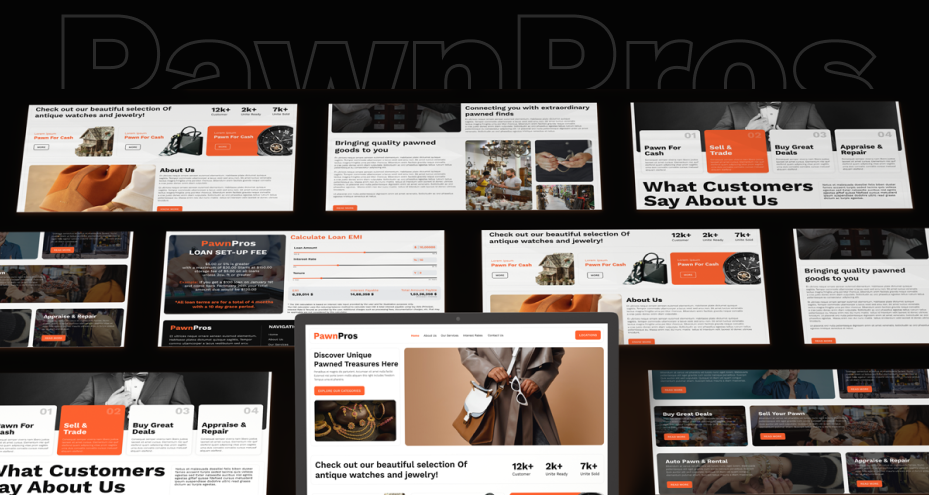
This UI design includes:
-
Homepage with clear service positioning
-
Inventory listing and product detail screens
-
Loan inquiry interface
-
Account pages
-
Contact and location layouts
The design system maintains consistent spacing, typography hierarchy, and scalable components.
Instead of constructing every grid manually, you adapt a ready-made framework.
-
Freelancers reduce project timelines.
-
Agencies standardize quality across clients.
-
Developers receive organized artboards ready for implementation.
It is not a decorative template. It is an operational blueprint.
Step-by-Step Launch Plan: From Design to Live Pawn Site
Execution determines results. Follow a structured process to make the pawn website live on the web.
1. Customize Branding
Replace default colors and typography first. Then, insert real inventory images. After it aligns messaging with the specific pawn business. Test visual balance after inserting real content.
2. Prepare for Development
Export optimized assets from the design team. Confirm spacing tokens in the source code. Share design specifications clearly and analyze how it works for the front-end and back-end development. Here, clear documentation prevents misinterpretation.
3. Build and Test
During the implementation of the pawn website development process, check the following:
-
Validate that responsive behavior works for every device and internet connection.
-
Test form submissions to understand whether the data input fields work normally and convey the data on the web securely.
-
Confirm image scaling is responsive from iOS and Android devices to a big LED screen like a desktop without any additional CSS for front-end website development.
-
Review navigation logic that follows the UI design principles and optimize through coding.
Functional testing protects user trust. It is important to know, if not that, the overall work has been compromised.
4. Final Review Before Launch
Before going live with the website, optimize it for the following:
-
Check mobile usability. See if the site works properly on the Android or iOS device, or face issues with navigation or functionality.
-
Verify CTAs optimized for the preferred actions, like inquiry about the loan or purchasing the products.
-
Review content clarity through a trusted and verified source that reduces the risk of losing trust in the shop.
-
Ensure consistent UI alignment is available from the homepage to the product page without losing focus.
A pawn shop website must feel dependable from the first interaction. This is the fact.
What’s Now
Is a well-designed pawn shop website template only a visual tool? It is a structured system that supports trust, inventory flexibility, and transactional clarity.
When the design foundation is strong and the Figma UI kit is built with development in mind, the entire process becomes faster, cleaner, and more scalable.
That is the real advantage of working with a purpose-built template instead of starting from zero.